The DNS MX record: a sign of trust?
Every email address ends with a domain name: whatever comes after the @. For a message to arrive, servers need to know where to deliver mail for that domain. That is the job of a tiny line in the Internet's directory: the MX record. Tiny, but essential… and very handy for spotting a fake address.
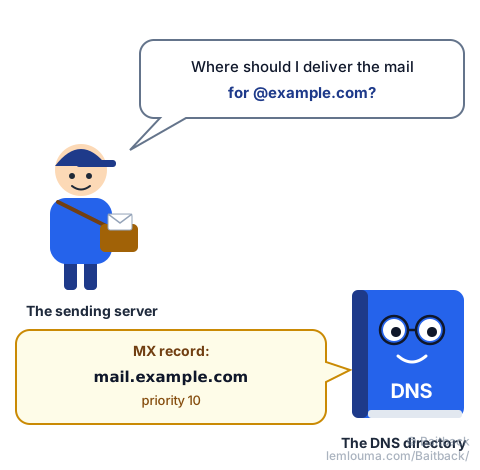
DNS, the Internet's directory
Computers only know numbers: IP addresses, such as 203.0.113.10. Humans prefer names, such as example.com. The DNS does the translation, like the contacts on a phone that turn "Mum" into a number.
For a website, the question asked to the DNS is simple: "what address is this site at?". The answer is an A record (or AAAA for newer IPv6 addresses). The browser goes straight to that address, and that's it.
Mail has its own signpost: the MX
Email gets special treatment: a record type all of its own, the MX (Mail eXchanger). It answers a different question: "for mail addressed to @this-domain, which server should we contact?".
Why a separate signpost? Because the machine that receives mail is often not the one that shows the website. A company can host its site with one provider and hand its email to Google or Microsoft. The MX is a way of saying: "the website is here, but letters go over there".
The Web does not need this detour: the browser visits the site at its address, full stop. For email, however, a domain that wants to receive mail has to declare an MX. The standard does include a fallback (if there is no MX, servers try the domain's own address), but it is an old leftover that serious domains do not rely on. No MX is like a house with no letterbox. It is step 3 of the guide How an email travels from sender to recipient.
| Service | Question asked to the DNS | Record type |
|---|---|---|
| Website | "Where is the site?" | A, AAAA |
| Email (receiving) | "Where should this domain's mail be delivered?" | MX |
| Email (protection) | "Who is allowed to send on behalf of this domain?" | TXT (SPF, DMARC) |
The first choice and the substitutes
A domain can declare several MX records, each with a priority number. The rule to remember: the lowest number goes first, like in golf. The others are substitutes, like goalkeepers on the bench: they only come on if the first choice does not answer. Here is what it looks like:
example.com.   MX   10   mail1.example.com.
example.com.   MX   20   mail2.example.com.
Here, mail goes to mail1 first (priority 10). If that server is down, mail2 is tried (priority 20). Big providers like Gmail declare several MX records this way, so that no message is ever lost.
A sign of trust… with a question mark
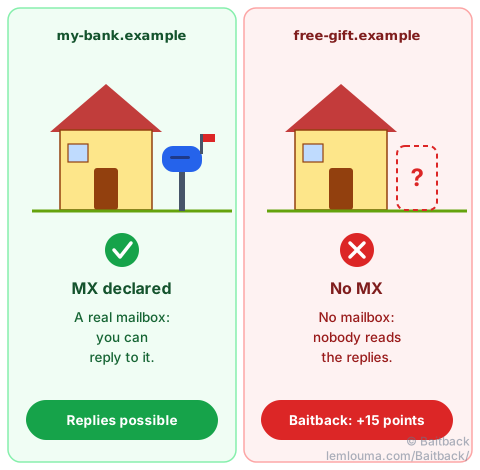
An MX being there is a minimum of seriousness. A real company, a real public body, a real person all want to be able to receive replies. So their domain has a letterbox.
No MX on the sender's domain is a warning sign. It means the address shown in "From:" cannot receive anything: if you reply, your message goes nowhere. The address was probably made up, or thrown away right after sending. That is typical of spam and phishing that churn out addresses by the dozen.
Careful, the question mark matters! An MX does not prove honesty. A scammer who buys a domain can give it an MX in two minutes, and even set up SPF, DKIM and DMARC. Another common mix-up: the MX says where mail arrives, not where it leaves from. The sending server does not need to be the MX; what governs sending is SPF, explained in the guide Phishing: how scammers get their emails through.
In short: no MX, big doubt. An MX, a good start, but keep checking.
Why Baitback checks it
When an email is analyzed with Baitback, the tool takes the domain of the "From:" address and asks the DNS: does this domain have an MX, or at least a fallback address? If the answer is no, Baitback shows an alert ("this domain cannot receive email: throwaway or made-up address") and adds 15 points to the alert score.
This check is never used on its own: it adds to the other clues (domain created a few days ago, name imitating a brand, SPF failing…). It is the whole picture that drives the score up and helps decide whether to report.
Check it yourself in 10 seconds
Everyone should get into this habit before replying to a stranger, clicking a link or paying for anything. Three ways to do it:
- The easiest: paste the email into Baitback, which does the check on its own, along with the other checks.
- On a computer (Windows, Mac or Linux), open a terminal and type:
On Mac and Linux, you can also use:nslookup -type=mx example.com
If the answer contains no "mail exchanger" or "MX" line, the domain has no letterbox.dig mx example.com +short - Online: many free "DNS lookup" websites show a domain's MX records in one click.
Do you own a domain name? Make sure it has an MX if it receives mail. And if it never sends or receives email, tell the whole world: a "null MX" and an SPF record that forbids all sending (v=spf1 -all) stop scammers from using your name convincingly.
Did you know?
- The MX was invented in 1986, only three years after the DNS itself. Email was one of the very first services to get its own signpost in the directory.
example.combelongs to nobody… almost. This name, likeexample.organd anything ending in.example, has been reserved since 1999 for use in examples. It cannot be bought: that is why guides use it.- There is such a thing as a "null MX". Since 2015, a domain can declare
MX 0 .: it is the "No junk mail, thanks" sticker on the letterbox. Servers then know there is no point insisting. - 13 names, hundreds of copies. At the very top of the DNS are the root servers, named by 13 letters, from A to M. But each one is copied in hundreds of places around the world: there is probably one not far from you.
- DNS has a memory. Each answer is kept in memory for a length of time chosen by the domain, the TTL: from a few minutes to a day. That is why a change of MX can take a few hours to be seen everywhere.
- DNS is the Internet's directory; the MX record says which server receives a domain's mail.
- The Web does not need an MX; email does: a domain that wants to receive mail must declare one.
- Several MX records are possible: the lowest priority number goes first, the others are substitutes.
- No MX on the sender's domain: big warning sign. Baitback detects it and adds 15 points to the score.
- An MX being there does not prove honesty: it is a minimum, not a guarantee.