How an email travels from sender to recipient
You click "Send", and a few seconds later the message appears on the other side of the world. It feels instant and direct. In reality, the email has travelled from server to server, a bit like a letter goes from mailbox to sorting office. Understanding this journey helps you understand why spam exists, and how its origin can be traced.
An email is a letter, not a phone call
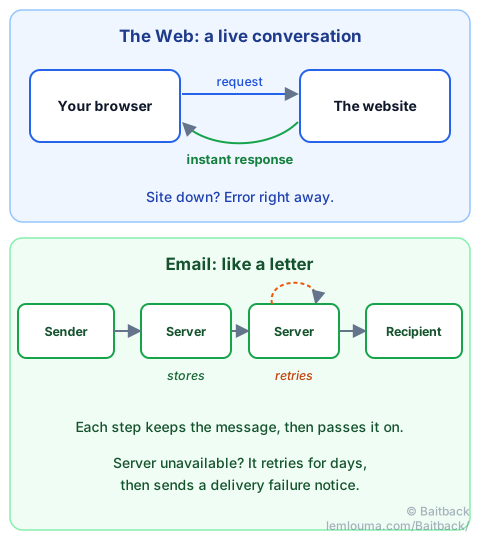
When you open a web page, your browser and the website talk live, like on the phone: the browser asks a question and the site answers right away. If the site is down, you know immediately, with an error message.
Email works differently: it is asynchronous, like the postal service. Nobody waits for an answer on the line. Each server receives the message, keeps it in storage, then passes it on to the next step when it can. If the recipient's server is down, the message is not lost: the sending server tries again regularly, for several days (often 4 or 5). If it still cannot get through, it sends you a delivery failure notice, the email version of "addressee unknown, return to sender".
The six stages of the journey
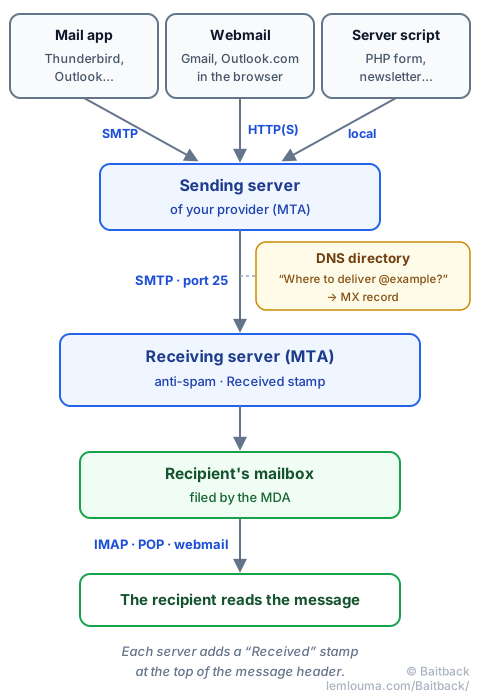
- Writing. You write the message in your email app. Specialists call it the MUA (Mail User Agent): it is your paper and pen.
- Dropping it off. The app hands the message to your provider's sending server, after identifying you with your password. It is the postbox on the street corner.
- Finding the address. The sending server looks at the recipient's domain (what comes after the @) and asks the Internet's directory, the DNS, which server receives mail for that domain. This information is called the MX record: it is the email's postcode.
- Transporting. The sending server contacts the receiving server and passes the message to it using the SMTP protocol. These transport servers are called MTAs (Mail Transfer Agents): they are the sorting offices. Sometimes there are several in a row (anti-spam gateway, company server…). Each one adds a stamp at the top of the header: a
Receivedline. - Delivering. Once the checks are passed (anti-spam, antivirus), the MDA (Mail Delivery Agent) files the message in the right folder: inbox or junk. It is the postman.
- Reading. The recipient collects their mail with their own app, which speaks IMAP or POP, or with a webmail in their browser.
| Postal mail | Technical name | |
|---|---|---|
| Writing the letter | Writing the message | MUA |
| The postbox | Your provider's sending server | MSA / MTA |
| The postcode | The record that points to the receiving server | DNS, MX |
| The sorting offices | The relay servers | MTA, SMTP |
| The postmarks | The lines added by each server | Received |
| The postman | Filing into the recipient's mailbox | MDA |
| The address on the envelope | The address used during transport | SMTP envelope |
| The letterhead | The "From:" shown by your email app | From field |
Three ways to send, one single route
An email can leave from three different places. Only the start of the journey changes:
- An email app (Thunderbird, Outlook, Apple Mail, the Mail app on your phone): it speaks SMTP, the language of email, directly with the sending server.
- A webmail (Gmail or Outlook.com in the browser, for example): your browser speaks HTTP, the language of the Web, with the provider's website. The provider then passes the message to its own mail server, using SMTP.
- A program on a server: a "Contact us" form written in PHP, an online shop sending its invoices, a newsletter… The program hands the message to the server's mail software, with nobody behind a keyboard.
In all three cases, the message ends up at an MTA, then at the recipient's MDA. The rest of the journey is exactly the same.
The famous port 25, and why your router blocks it
A server is like a big building: each service has its own numbered door, called a port. The Web uses door 443 (or 80), and since 1982, mail servers have been passing mail to each other through door 25.
Your email app, however, does not normally use that door: it drops its messages at your provider through port 587 (or 465), identifying itself with your password.
Many Internet service providers block outgoing port 25 on home connections. The reason is simple: otherwise, a computer infected by a virus could send thousands of spam messages directly to receiving servers, without any check. Every home would become a potential spam sender. By closing that door, the provider forces all mail through its own sending server, which identifies the sender and limits the number of messages.
That is also why scammers prefer to rent a server or hack one: there, port 25 is open. The guide Phishing: how scammers get their emails through explains these techniques in detail.
The scammer's email takes exactly the same route
Everything about email is standard: the same rules apply all over the world, which is what lets anyone write to anyone. A scam email therefore follows exactly the same route as an honest one. Only the starting point changes: a server rented for a few days, a hacked website, a stolen account.
And just like a letter, there is on one side the envelope, used by servers to carry the message, and on the other the letter itself, with its "From:" header that you see displayed. Nothing forces the two to match. That is why the displayed sender can be forged so easily.
On the other hand, the Received stamps added by the receiving servers, and above all by yours, tell the truth about where the message came from. That is exactly where Baitback looks for the IP address of the server that sent the email.
Did you know?
- The first email dates from 1971. American engineer Ray Tomlinson sent it between two computers sitting side by side. He is the one who chose the @ sign, to separate the person's name from the machine's name.
- No accents at first! The SMTP protocol, published in 1982, only carried plain text in English characters: no accented letters, no attachments, no pictures. All of that arrived with the MIME standard, from 1992 onwards: it turns any file into text so that it can travel. A fun consequence: an attachment grows by about a third during the journey.
- No maximum size in the standard. Servers set their own limits: often between 20 and 50 MB per message, certain file types banned (
.exe,.js…), a quota per mailbox, a maximum number of messages sent per day. The standard only requires… that a line not exceed 998 characters. - Addresses with accents. Since 2012, a standard allows addresses such as
josé@café.example. They are still poorly accepted by many servers. - A conversation you can read in plain text. Servers talk to each other with text commands you could almost type by hand. Here is a simplified exchange (C: the sending server, S: the receiving server):
S: 220 mx.destinataire.example ESMTP
C: EHLO mail.expediteur.example
S: 250 mx.destinataire.example
C: MAIL FROM:<alice@expediteur.example>
S: 250 OK
C: RCPT TO:<bob@destinataire.example>
S: 250 OK
C: DATA
S: 354 End data with <CR><LF>.<CR><LF>
C: From: Alice <alice@expediteur.example>
C: Subject: Bonjour !
C:
C: Salut Bob !
C: .
S: 250 OK: queued
C: QUIT
The MAIL FROM and RCPT TO lines make up the envelope; the From: line is part of the letter. The message ends with a line containing only a dot.
- An email does not go straight from sender to recipient: it passes through several servers, like a letter through sorting offices.
- Email is asynchronous: each server stores the message then passes it on, and retries for several days if needed.
- Email app (SMTP), webmail (HTTP) or script: three possible starting points, then one single route.
- Port 25 is used for transport between servers; many providers block it on home connections to limit spam.
- Scam emails follow the same standard route, and the
Receivedstamps keep a trace of their real starting point.