Phishing: how scammers get their emails through
Email providers filter billions of unwanted messages every day. Yet scam emails still land in our inboxes. That is no accident: scammers know the checks and have learned to get around them. Here are their main techniques, explained simply, along with the trace each one still leaves behind.
Pretending to be someone else
The first technique is not technical at all: it is imitation. The message copies the logo, colors and tone of a bank, a delivery company or a government agency. Several details are designed to fool a quick glance:
- The display name: your email app often shows "My Bank Customer Service" in large letters, and the real address in small print, or not at all.
- Look-alike addresses: one character swapped (
paypa1instead ofpaypal), an "rn" that imitates an "m", or the brand name placed at the start of an address that belongs to someone else, such asmybank.account-check.example. - Urgency: account blocked, parcel on hold, fine to pay within 48 hours. The pressure is meant to make you act before you think.
The trace: an imitation fools the eye, not the servers. The real address and the sending server remain visible in the full header of the message.
Forging the sender: as easy as writing on an envelope
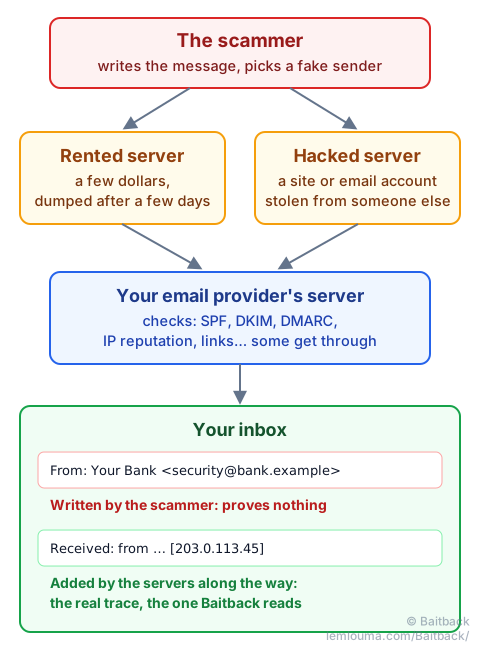
Many people believe the sender's address is verified. It is not. The "From:" field of an email is like the return address on the back of an envelope: anyone can write whatever they like. A few lines of code on a web server are enough to send a message that seems to come from your bank, your employer… or yourself. That is exactly how blackmail emails work when they claim to have hacked your mailbox, with "proof": the message appears to come from your own address.
Three mechanisms exist to limit this abuse:
- SPF: the list of servers allowed to send email for a domain;
- DKIM: a signature, like a wax seal, proving the message really comes from the domain and has not been altered;
- DMARC: the instruction the domain gives recipients when the two previous checks fail: do nothing, send to spam, or reject.
These protections work… when they are in place and enforced. But many domains publish a DMARC policy that simply says "do nothing", and some receiving servers ignore it. Above all, a scammer can buy a look-alike domain and configure it properly: their emails then pass SPF, DKIM and DMARC without a single error. These checks prove that a message really comes from a given domain, not that the domain is honest.
The trace: every server that passes the message along adds a Received line at the top of the header. The scammer can invent fake ones at the bottom of the stack, but cannot stop the following servers from adding theirs. The line added by your own email provider faithfully records the IP address that delivered the message: that is the one Baitback looks for.
Renting a server for a few dollars
Sending thousands of emails requires a machine connected to the Internet. Nothing could be easier: anyone can rent a virtual server (a "VPS") for a few dollars a month, often billed by the day, sometimes paid with a stolen credit card. The scammer uses it for one campaign, a few hours or a few days. As soon as the server's IP address shows up on blocklists, they drop it and rent another, from the same hosting provider or elsewhere in the world.
That is why blocking an IP address in your own mailbox is not enough: the next campaign will come from a different address.
The trace: every rented server belongs to an identifiable hosting provider whose terms of service forbid spam. Once alerted through its reporting address (the "abuse" contact), it can shut the server down. This is the most effective way to stop a campaign in progress.
Using someone else's server
Even more discreet: sending from a machine that does not belong to the scammer. Two situations are common:
- A hacked website: a poorly maintained site (an old WordPress, a forgotten plugin) gets a small sending script installed without its owner knowing.
- A stolen email account: using a password obtained through an earlier phishing attack, the scammer sends messages from a real mailbox at a real provider, sometimes one belonging to a company or a university.
In this case, the message leaves from an honest server with a good reputation. SPF and DKIM often pass. Filters find it much harder to tell apart from a legitimate email.
The trace: the IP address and the sending server remain visible in the header. Reporting to the hosting or email provider also helps the legitimate owner, who often has no idea their site or account is being misused.
Not all servers are equally strict
Large providers such as Gmail enforce strict rules: sending limits, verification, quick blocking of abusive accounts. Other servers, such as small hosting providers or badly configured machines, are far more permissive. The same goes for receiving: some email services reject anything doubtful, others let a lot through.
Scammers do not need to beat the strictest servers: they only need to find the weakest link. With millions of servers in the world, there is always one somewhere.
Links that hide from robots
When an email arrives, many email services automatically visit its links to check that they do not lead to a dangerous page. Scammers know this and put a bouncer at the door:
- the link in the message first leads to a harmless-looking page, or to a redirection service;
- that page shows an "Are you human?" check, like the checkboxes seen on many websites, or quietly examines the visitor;
- an analysis robot does not pass the check: it only sees a blank or harmless page, and concludes the link is safe;
- a human, on the other hand, passes the check without a second thought… and lands on the fake login page.
Some links are also activated later: perfectly clean when the email is delivered and checked, they only redirect to the trap page a few hours later.
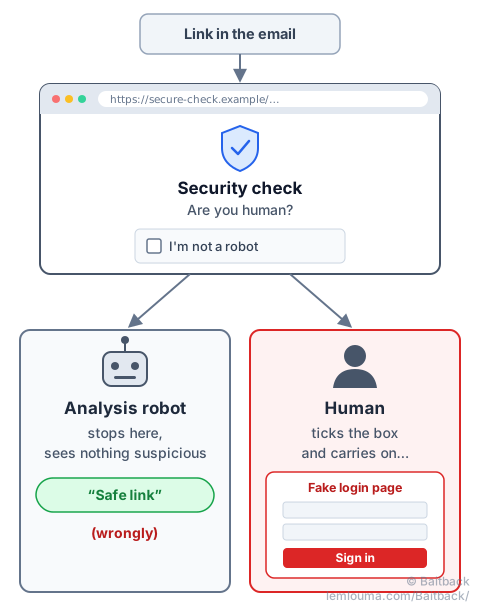
The trace: the original link stays in the message. Baitback follows it and shows the redirections, and the starting address can be reported even when the final page is hiding.
Why it keeps happening: reporting is too complicated
All these techniques share a weak point: they rely on servers, IP addresses and domain names that belong to identifiable hosting providers. A well-targeted report can get a server shut down within hours.
The problem is the effort required. Official platforms play an important role, especially for prosecution. But on PHAROS, France's official reporting platform, for example, you may have to go through more than ten pages before finding the right category. And to get the sending server shut down, you still have to find the hosting provider and its reporting address, then write a clear message with the right evidence. Few people go all the way, and scammers take advantage of it.
That is why Baitback exists: you paste the email, the tool finds the sending server, its hosting provider and its reporting address, then prepares ready-to-send messages. A single step instead of an obstacle course.
- The displayed sender name and address prove nothing: they are written by the sender.
- An email that passes SPF, DKIM and DMARC really comes from the stated domain, but that domain may belong to the scammer.
- A link that looks clean when the email is delivered can still lead to a trap page.
- The real origin of an email is in its full header, in the
Receivedlines. - Reporting to the sending server's hosting provider is the fastest way to stop a campaign.