Open redirects: when a real, trusted link leads to the attacker
You hover over a link, you see google.com or the name of a site you know well appear, and you click without hesitation. Yet you land on a phishing page. It isn't a display glitch or a spoofed address: the link really did, at first, lead to the real site. This is the mechanics of an open redirect.
What is an open redirect?
Many sites offer a perfectly legitimate feature: redirecting a visitor to another address after an action, for example after logging in, clicking a sponsored link, or using a link shortener. The site receives the destination address in its URL, then sends the browser on to that address.
The flaw appears when the site accepts any destination address, without checking that it belongs to an approved list. The developers built a useful redirect service; they simply forgot to close the back door. Anyone can then craft a link that starts with the name of a trusted site but ends its journey somewhere else, at the attacker's.
Anatomy of a trapped link
Take a deliberately simplified example structure:
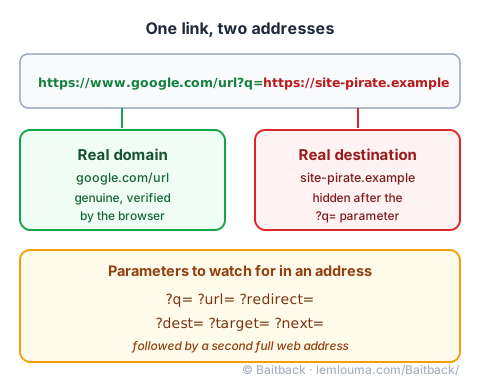
https://www.google.com/url?q=https://site-pirate.exampleThis link does open on Google's servers: the domain name google.com is genuine, and nothing in the address bar lies about that. But the ?q= parameter carries a second address, which becomes the real destination once the redirect fires. The same trick shows up with other equally common parameter names: ?dest=, ?redirect=, ?target=, ?next=, or ?url=. Spotting one of these keywords right after a question mark, followed by a second web address, is the simplest signal to watch for.
Why attackers love this technique
This method solves two problems at once for an attacker.
- Bypassing spam filters. Secure Email Gateways assign a trust score to the domains present in an e-mail. A link that starts with an extremely reputable domain, such as a search engine's or a major social network's, often scores very well, even though the filter never looks at the hidden part of the link.
- Manipulating human reading. A careful person has learned to check the domain name before clicking. Faced with this type of link, that habit works against them: they clearly see the official brand name right at the start of the address, and stop reading there.
The trick thus benefits from trust that is both technical (the spam filter's score) and human (the reading reflex), without having to imitate either the domain or the servers of the trusted site.
Under the hood: codes 301, 302, and redirect chains
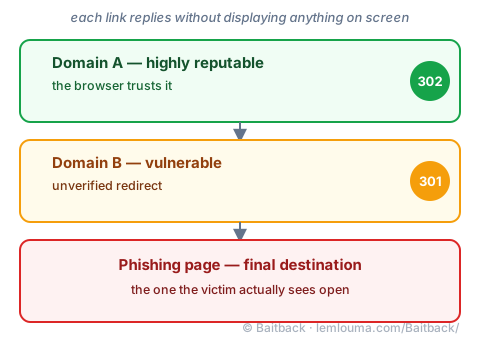
Technically, a redirect plays out in a very short response from the server to the browser. The server replies with an HTTP status code, without displaying a visible page: 302 for a temporary redirect, 301 for a permanent one. The browser obeys immediately and loads the next address, without the user seeing anything happen.
Nothing prevents chaining several redirects one after another: a highly reputable domain A, to a more modest domain B, itself vulnerable, to the final phishing page. Each extra link muddies the trail a bit more and makes it harder for anyone trying to trace the link back to its origin just by looking at it.
How to spot the trap and react
The right approach is to read the full address, from left to right, without stopping at the first name you recognize. The signal to look for is simple: a second http:// or https:// hidden further along the same line almost always signals an open redirect, just like the presence of a parameter such as ?q= or ?url= right before it. This vigilance is the same kind needed to read a deceptive domain name by other means, such as look-alike letters: see the Punycode and homographs guide.
To check a destination without any risk, you can paste the address into an online link resolver, or run a curl -I command from a terminal: the server replies with the redirect code and the final destination, without ever loading the page in a browser.
Two reports are useful, and concern two different parties. First, notify the company whose domain serves as the starting point (for example via its security form or its address dedicated to vulnerabilities), so it can fix the unverified parameter in its code. Then notify the host of the landing page, exactly as for any phishing page (see finding a host's abuse@ address), since it's the host that can make it disappear.
An e-mail containing this kind of link, moreover, remains an e-mail sent by a real server, with its own trace: see the Analyzing a phishing case: from message to infrastructure guide. By pasting the full e-mail into Baitback, the tool follows the entire redirect chain itself, all the way to the final page, without needing to click or open a terminal.
- An open redirect is a legitimate feature turned against its purpose: the starting site is real, the destination isn't necessarily.
- Parameters to watch for look like
?q=,?url=,?redirect=,?dest=,?target=or?next=. - This technique fools both spam filters, thanks to the first domain's reputation, and human reading, which often stops too soon.
- Codes 301 and 302 make it possible to chain several invisible redirects before reaching the trapped page.
- Read the whole link, and report both the starting site (so it can fix the flaw) and the host of the final page.