Analyzing a phishing email: from the message to the infrastructure
A phishing email looks like an anonymous letter. Yet it leaves clues everywhere: stamps on the envelope, a reply address, a link to a site that has to be hosted somewhere. With a little method, we can follow those clues back to the companies that rent out their machines to the scammer, often without knowing it. And they are the ones who can shut everything down. Here is the investigation, step by step: read the header, follow the trails to the infrastructure, then decide who to report what to.
Getting the full header: the message's envelope
What the mail app shows (the sender, the subject, the text) is just the letter. Around it there is an invisible envelope: the header, dozens of technical lines added along the way. That is where the clues hide. To display it:
- Gmail: the message's ⋮ menu, then “Show original”;
- Outlook: the message's … menu, then the option that shows the message details or source;
- Apple Mail: the View menu, then Message and the option to show all headers;
- Thunderbird: the Ctrl+U shortcut (Cmd+U on a Mac), which opens the message source.
Tip: don't “forward” the message to analyze it. Forwarding creates a new email with a new header, and the original clues disappear. Copy the full source instead, or save the message as an .eml file.
The Received lines: the post office stamps
Of all these lines, the most valuable ones start with Received:. Every server that handles the message adds its own, at the very top of the pile, like a post office stamping the envelope each time it passes through. The full journey of an email is told in the guide How an email travels from sender to recipient.
Here is a simplified header, like the ones found in real phishing:
Received: from mx1.provider.example (mx1.provider.example [192.0.2.10])
        by mailbox.provider.example; Tue, 15 Sep 2026 09:14:05 +0200
Received: from vps-4411.host.example (vps-4411.host.example [203.0.113.45])
        by mx1.provider.example with ESMTPS; Tue, 15 Sep 2026 09:14:03 +0200
Received: from mail.mybank.example (unknown [10.0.0.7])
        by vps-4411.host.example; Tue, 15 Sep 2026 07:13:58 +0000
Authentication-Results: mx1.provider.example;
        spf=pass smtp.mailfrom=parcel-mail.example; dkim=none;
        dmarc=fail header.from=mybank.example
Return-Path: <bounce@parcel-mail.example>
From: "My Bank" <security@mybank.example>
Reply-To: mybank.support@freemail.example
Subject: Your account will be suspended within 24 hours
Each Received line reads like a short sentence: “received from such machine, by such server, at such date”. Right after from comes the name the machine announced when introducing itself, with no check at all. In the parentheses comes what the receiving server actually observed: the IP address of the machine in front of it, in square brackets.
Read from bottom to top… but trust from top to bottom
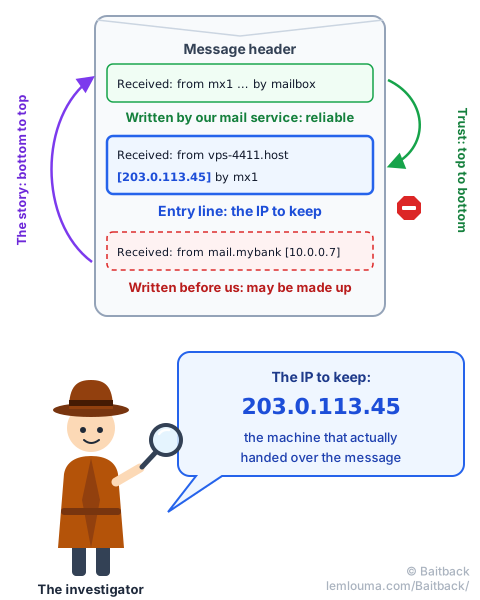
Since every server adds its line above the previous ones, the story reads from bottom to top: the bottom line tells the departure, the top one the arrival in our mailbox. In the example, the message leaves a machine calling itself “mail.mybank.example”, goes through vps-4411.host.example, then enters our mail service.
But not all lines are equal. A line is always written by the server that receives. The top ones are therefore written by our own mail service: we can trust them. The bottom ones were written before the message reached us, possibly by the scammer's machine, which can put whatever it likes there. It's like a parcel: the stamps from our post office are reliable, the labels stuck on before departure prove nothing.
So the method is simple: start at the top and go down as long as the lines are written by our mail service. Stop at the entry line, where our mail service receives the message from an outside machine. The IP in square brackets on that line, here 203.0.113.45, is the most solid clue in the whole header: it is the machine that actually handed over the message. It is precisely the one Baitback looks for.
And the bottom line? It claims the message comes from “mail.mybank.example”, from the address 10.0.0.7, a private address that doesn't exist on the Internet. It was written by vps-4411 itself: it's a false trail, laid on purpose.
What is reliable, what can be faked
| Header item | Who writes it | Trust |
|---|---|---|
From (displayed name and address) | The sender | None |
Reply-To (reply address) | The sender | None… but it's often a real mailbox, read by the scammer |
Subject, Date, Message-ID | The sender | Low |
The name announced right after from | The machine on the other side | None |
The Received lines below the entry line | Earlier servers, possibly the scammer | Low |
| The IP in square brackets on the entry line | Our mail service | High |
Authentication-Results | Our mail service | High, for what it checks |
In the example, Authentication-Results says a lot. spf=pass means the server was indeed allowed to send… for parcel-mail.example, the envelope domain, not for the bank. dmarc=fail means the displayed address mybank.example matches nothing verified: the “From” is fake. Why did the message get through anyway? That's the whole topic of the guide An email can lie… even when the checks say “OK”.
From IP to operator: who owns this address?
An IP address is the postal address of a machine on the Internet. Like postal addresses, they are handed out in large blocks. Five regional registries take care of that: RIPE NCC (Europe and the Middle East), ARIN (North America), APNIC (Asia-Pacific), LACNIC (Latin America) and AFRINIC (Africa). They assign these blocks to operators, who rent them to their customers.
These blocks are grouped into networks, each identified by a number: the ASN, for example AS64500. If the IP is the house address, the ASN is the neighborhood, and it names the operator that manages it and routes traffic there.
To find out who is behind an IP, we query these registries' directory with a WHOIS lookup, or with its modern version, RDAP. Many free websites do it in one click. On the command line, it looks like this (simplified excerpt):
$ whois 203.0.113.45
inetnum:        203.0.113.0 - 203.0.113.255
netname:        HOST-EXAMPLE-VPS
org-name:       Host Example SAS
country:        FR
abuse-mailbox:  abuse@host.example
origin:         AS64500
Three pieces of information matter: who (the organization's name), where (the country, useful to know which laws apply) and above all the abuse address, the official mailbox that receives abuse reports. The IP's reverse name, here vps-4411.host.example, often gives one more clue: “vps” points to a rented virtual server.
A classic trap: the network operator isn't always the final host. A large operator can rent a block of addresses to a reseller, who in turn rents servers to its own customers. The WHOIS then shows a small block in the reseller's name, with its own abuse address. That's who we contact first: it is the closest to the machine.
Following the other trails: the sender, the link, the DNS
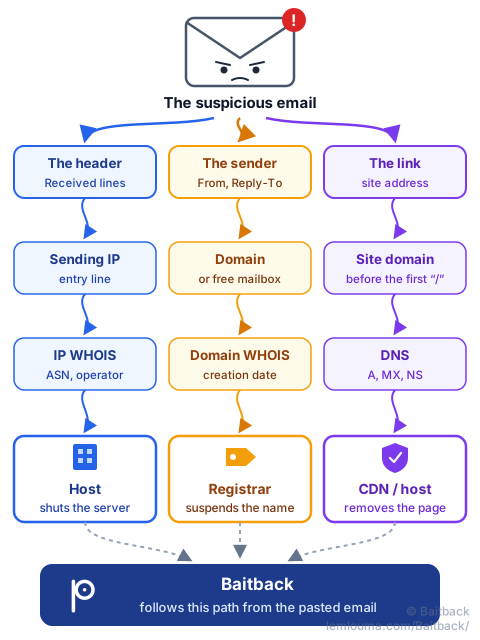
The sending IP is just one thread. A phishing email leaves others, and each leads to a different player.
The sender trail
Look at the domains that appear in From, Return-Path and Reply-To:
- a free email service (like Gmail or Outlook.com): the player is the provider, which can close the account. This is especially useful for the
Reply-To, the mailbox where victims' replies land; - a domain created for the occasion: look up its registrar, the company that sold it, with an RDAP or WHOIS lookup on the domain, for example on lookup.icann.org. It also shows the creation date: a “banking” domain born three days ago is a very bad sign;
- a brand's real domain, spoofed: the brand has nothing to do with it, it didn't send the message. It can be warned if it offers an address for reporting phishing.
The link trail
The message's link leads to the trap page, which has to be hosted somewhere. Don't click: copy the address (right-click, “copy link”). The name that matters is the domain, just before the first “/” after https://; everything to its left is freely chosen by the scammer. Links often go through several redirects: Baitback follows them for us and shows the whole chain. For links hidden in an image, see the guide Quishing: when phishing hides behind a QR code.
The DNS trail
The DNS, the Internet's directory, says where each piece of a domain lives. Three questions are enough:
$ dig +short A  secure-login.example    # the website's IP (sometimes a CDN)
$ dig +short MX secure-login.example    # the servers that receive its email
$ dig +short NS secure-login.example    # who runs its DNS directory
The site's IP then goes through the same mill as the sending IP: WHOIS, ASN, operator, abuse address. And a domain with no mail server at all that claims to be writing to us deserves a look: see The DNS MX record: a sign of trust?
Why there are always several providers
At the end of the investigation, we rarely end up with a single name. That's normal: a phishing campaign is like a house move done entirely with rentals. The domain name is bought from one registrar, its DNS is run by another company, the page sits on a server rented elsewhere and hidden behind a CDN, the emails leave from a third server (see Phishing: how scammers get their emails through), and the replies land in a free mailbox.
Scammers have good reasons to spread everything out: each service is cheap, often paid for with stolen means; if one provider pulls the plug, the others keep running; and a CDN in front of the site hides the real server's address. Good news: every provider is also a lever. The more of them we warn, the faster the campaign collapses.
An IP is not a culprit
A common temptation: find the IP, read the name of a company or a country, and conclude “it's them”. That's almost always wrong. The IP points to the last machine that handed over the message, not the person behind the keyboard. That machine can be:
- a server rented for a few days by the scammer, the simplest case;
- the server of a major email provider, if the scammer opened or stole an account there: the IP is then the provider's, which isn't to blame but can close the account;
- a hacked website or computer, whose owner is a victim too;
- a VPN or relay, which hides the real connection.
So the right question isn't “who is guilty?” but “who can act on this machine?”. That's the player we write to. We never contact the scammer, we don't “strike back”, and we don't publicly accuse a company whose server may have been hijacked.
Domain or server: the sign and the building
To understand who does what, a picture helps a lot. Imagine a fake bank branch on a street:
- the domain name is the sign above the door, and the registrar is the body that rented out that name: it can take the sign down;
- the server is the building where the fake branch is, and the host is its landlord: it can evict the tenant;
- the IP address is the street address written on the plaque;
- the CDN is a front desk set up in front of the entrance: visitors talk to the front desk, which passes their requests on to the building. From the street, it's all you see.
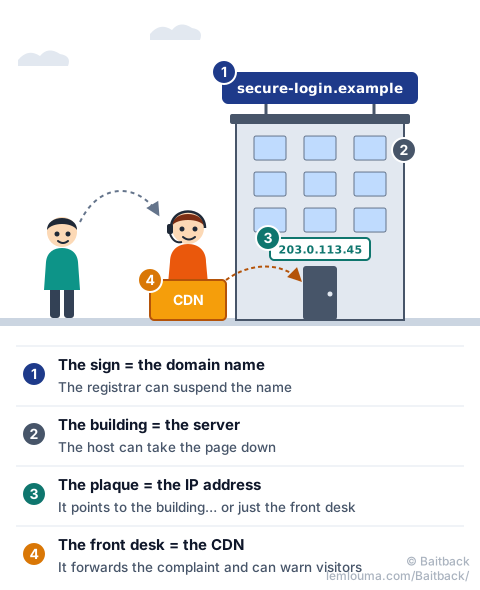
Shutting down the server removes the page, but the scammer can point the domain to another server within minutes. Suspending the domain, on the other hand, makes every link already sent useless, even if the server is still running. The two complement each other.
The CDN case
If the WHOIS of the site's IP returns a name like Cloudflare, Akamai or Fastly, it is almost never the host: it's the front desk. The CDN accepts reports, can show visitors a warning page and forwards the complaint to the real host, whose address it knows. Cloudflare, for example, offers a dedicated form at abuse.cloudflare.com. We also report to the domain's registrar, which the CDN doesn't hide.
The compromised server case
An address like https://dupont-bakery.example/wp-content/uploads/x/login.php often gives away a hacked website. The domain has existed for years and belongs to a real business; the trap page was slipped into a corner. Here, asking for the domain to be suspended would be unfair and ineffective: we warn the host, and the site owner if we can find their contact, giving the page's exact address. Same logic for an email sent from a real, hacked mailbox: we warn the provider, which can block the account and give it back to its owner.
Who to contact depending on the situation
| What we found | Who to report it to | What they can do |
|---|---|---|
| The sending IP belongs to a host (rented server) | The host's abuse address (IP WHOIS) | Shut down the sending server |
| The message comes from a well-known email service | The email provider | Close or block the account |
The Reply-To is a free mailbox | That mailbox's provider | Close the mailbox that receives the replies |
| A domain created for the scam | The registrar (domain RDAP or WHOIS) | Suspend the domain |
| A site behind a CDN | The CDN, then the registrar | Warn visitors, forward to the host |
| A hacked legitimate website | The site's host, and its owner | Remove the page, fix the site |
| A shortened link | The link-shortening service | Disable the link |
| Any phishing page | Google Safe Browsing, Microsoft, Netcraft… | Block the page in browsers |
Official platforms exist too. In France, for example, emails can be forwarded to Signal Spam and scams reported on PHAROS; each country has its own equivalents. These platforms mainly serve statistics and investigations: they won't shut a server down within the hour, but they keep an official record.
Building your reporting chain
Reporting everything, in bulk, to everyone works poorly. It's better to go in order, from the most urgent to the most lasting:
- Stop the damage: the trap page (host or CDN) and the browsers' block lists. Every hour counts: a campaign makes most of its victims in its first hours.
- Cut the name: the domain's registrar, to make the links already sent useless.
- Cut the sending: the host of the sending IP, and the provider of the
Reply-Tomailbox. - Leave a record: the official platforms, for investigations.
A good report is short and verifiable. It contains:
- the message's full header, not just a screenshot;
- the exact item that concerns that recipient: the IP for the host, the domain for the registrar, the page's exact address for the site's host;
- the date and time, with the time zone;
- defanged links, written for example
hxxps://secure-login[.]example, so that nobody clicks by mistake.
That is exactly the job Baitback does: paste the email's source, and the tool reads the Received lines, finds the sending server, its host and its abuse address, checks SPF, DKIM and DMARC, follows the links and their redirects, then prepares ready-to-send report messages. This guide's investigation, in a few seconds.
- The full header is available through “show original” or the message source; don't forward the message.
- The
Receivedlines tell the story from bottom to top, but only trust the ones written by our mail service. - The most reliable IP is the one on the entry line, where our mail service receives the message from outside.
- IP → WHOIS → operator and abuse address; domain → registrar; DNS → the site's servers.
- An IP points to a machine, not a culprit: write to whoever can act.
- The registrar cuts the name, the host cuts the machine, the CDN forwards: warn each of them about what concerns them.