An email can lie… even when the checks say “OK”
Behind the scenes of a technology that is several decades old, attackers have learned to play with the rules. Identity checks have been added to email, and they work. But they only answer one question: where does this message come from? Never the one that matters most: is it telling the truth?
The first lie: “I am your bank”
The story starts with an email, like thousands that arrive every day:
From: support@mybank.example
Subject: ⚠️ Your account will be suspended today
Everything looks normal: the logo, the signature, the address, the professional tone. But who really sent this message?
This is where we discover a strange legacy of the Internet: email was never originally designed to prove who sent it.
A postcard, not registered mail
Sending an email is a bit like sending a postcard: you write a message, you write a sender's name, and the mail carrier delivers it. But the carrier does not check that the name written on it really belongs to the person who posted the card. (To follow this mail carrier step by step, see the guide How an email travels from sender to recipient.)
The first email protocols were born in a tiny Internet, where everyone more or less knew each other. Trust went without saying. Today, the same technology carries a huge share of our communications. There is no way to switch everything off and rebuild email properly: it would be like changing a plane's engines in mid-flight.
Three inspectors at the door: SPF, DKIM and DMARC
Since email could not be rebuilt, engineers added identity checks on top of it. Rather than technical definitions, picture them as three characters standing at the entrance of your mailbox.
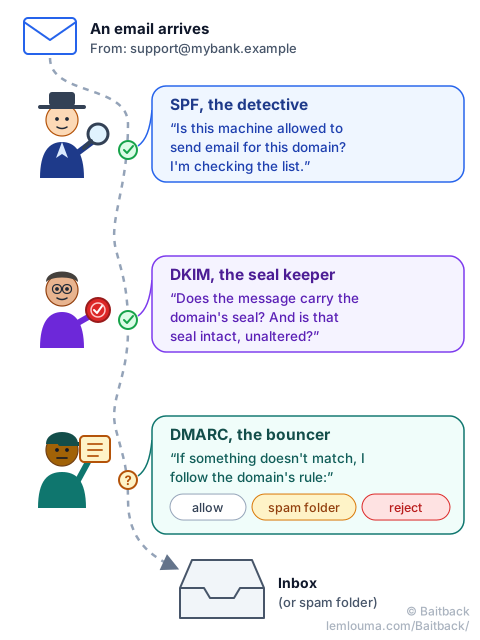
- SPF, the detective: “Is this machine allowed to send email for this domain?” The domain publishes the list of its authorized servers; the detective checks it.
- DKIM, the seal keeper: “Does the message carry the domain's digital signature, and is that signature intact?” Like a wax seal, it proves that the message really comes from the domain's infrastructure and was not altered on the way.
- DMARC, the bouncer: “What do we do if something doesn't match?” The domain leaves it an instruction: let it through, send it to spam, or reject it.
On paper, it is solid. So how do attackers still get through?
The twist: a genuine email… that is still a scam
This is the heart of the problem. The three inspectors check the technical identity of the message. But there are at least four ways to obtain a perfectly valid technical identity.
Trap no. 1: the almost perfect fake domain
The attacker buys their own domain name, one that looks exactly like the bank's:
support@mybank-pr1vate.example (instead of mybank-private)A simple “1” replaces an “i”. The attacker sets up SPF, DKIM and DMARC correctly: it is their domain, they are allowed to. The inspectors therefore answer, in all honesty: ✅ “This domain is indeed authorized to send this message.” Meanwhile, the reader's brain reads: 😱 “It's my bank!”
The tools check who is sending. They do not understand the intent of the message.
Trap no. 2: the forgotten door
A large bank owns hundreds of subdomains: one for promotions, one for an old contest, one for a service shut down five years ago… Somewhere, promo.old-bank.example still exists, and nobody really looks after it anymore.
If this subdomain still points to a service that no longer exists, or if it is poorly protected, an attacker can sometimes take control of it. They don't need to force the front door: they simply look for a side door everyone has forgotten. And whatever they publish behind it carries the bank's real name.
Trap no. 3: stealing the real keys
What if the attacker didn't even create a fake address? If they stole a real employee's password, through an earlier phishing email for example, their messages would leave from the company's genuine infrastructure. SPF, DKIM and DMARC work normally, and for good reason: everything is authentic. This time, it is no longer a fake identity. It is a real identity used by the wrong person.
Trap no. 4: blending into the tools everyone uses
Companies send their newsletters and campaigns through specialized platforms that are well known and well rated by filters. Attackers can try to abuse these platforms when they are poorly configured or when a customer account on them has been hacked. So the attacker doesn't always build their own system: sometimes they slip into someone else's, where they go unnoticed. The guide Phishing: how scammers get their emails through details these sending techniques.
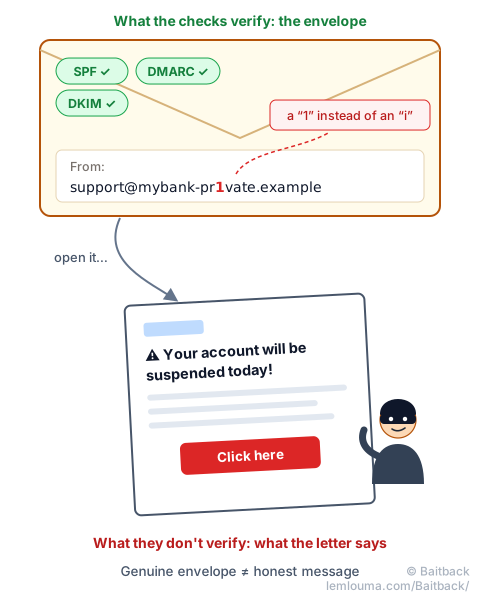
SPF, DKIM and DMARC help verify the technical identity of a message. On their own, they cannot tell whether its content is true. It is like checking that the envelope is genuine without being able to guarantee that the letter inside isn't lying.
Sometimes the problem starts before the attacker even shows up
Back to real life. A mail server is not secure just because it works.
The copy-and-paste trap
An administrator searches for “set up a Postfix server quickly”. They find a tutorial, copy the commands, and… it works. End of story? Not necessarily. A configuration that gets you started fast is not necessarily a hardened configuration, one tuned to withstand attacks.
The server that becomes a spam machine
A bad configuration can turn a server into an open relay: a machine that agrees to forward anyone's messages, when it should only serve its own users. For an attacker, it is a godsend: an honest server with a good reputation, sending their emails for them.
And no need to search by hand. The cycle is simple: scan → test → find → exploit, and it automates very well. So it is no longer necessarily an attacker sitting at a screen looking for victims. Often, it is machines searching for other machines, day and night.
While we think, the machine is already attacking
A malicious email can be sent → received → opened → clicked → exploited within minutes. Meanwhile, on the defense side, systems must analyze the message, teams must receive the alerts, someone must interpret them, and then the filtering rules must be updated. Every minute counts.
Hence a simple idea: a security system that nobody monitors eventually stops being truly secure. Rules age, attackers adapt, alerts pile up unread.
Saving those minutes is also why Baitback was created: you paste the suspicious email, the tool finds the server that actually sent it and its hosting provider, and prepares the report. The earlier a sending server is reported, the sooner it can be shut down.
Can email be made foolproof?
Probably not with a single technology, because the problem has several layers:
- 📨 The protocol: designed in another era, for another Internet.
- 🔐 The infrastructure: sometimes misconfigured, sometimes aging, sometimes forgotten.
- 🤖 Detection systems: able to spot a huge number of things, but not everything.
- 🧑 Humans: able to sense a trap… and to be manipulated.
If technology alone is not enough, what are researchers doing to make detection smarter? That is the subject of the next guide: Phishing: the cat-and-mouse game between researchers and attackers.
- Email was not designed to prove who sends it: SPF, DKIM and DMARC were added afterwards.
- These checks verify a message's technical identity (the envelope), not the honesty of its content (the letter).
- A look-alike domain, a forgotten subdomain, a stolen account or a hijacked sending platform can all produce a “valid” email.
- A misconfigured server can become a relay for spammers, found automatically by bots.
- Speed matters: reporting the sending server early, for example with Baitback, shortens the life of a campaign.