Quishing: when phishing hides behind a QR code
“Scan this code to sign the document.” The sentence looks harmless, and so does the little black-and-white square. Yet behind that QR code there is often a fake sign-in page. The technique has a name: quishing, a blend of “QR” and “phishing”. Let's see why it works so well, and how we can unmask and then report the site hiding behind it.
What is quishing?
A QR code is nothing more than text written in little squares. Most of the time, that text is a web address. When we scan it, the phone reads the text and offers to open the page.
Quishing reuses the classic phishing scenarios, but replaces the clickable link with a QR code:
- a document “to sign” or “shared with you”;
- two-factor authentication “to reactivate before tonight”;
- a parcel on hold, a fine, a refund.
It also shows up outside email: stickers placed over the real QR codes on parking meters, charging stations or restaurant menus. The principle stays the same: get people to scan, then get them to type.
Why a QR code slips through the net
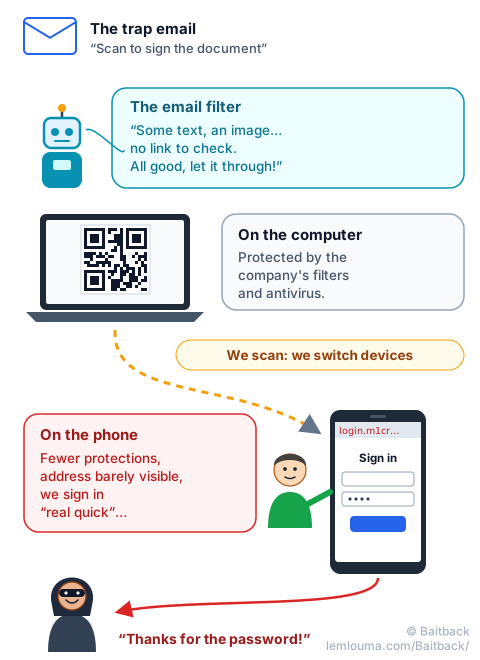
Email filters are very good at one thing: reading an email's text, spotting links and checking where they lead. But a QR code is not a link, it is an image. For a filter that cannot decode it, the email contains… no link at all. It therefore looks cleaner than an ordinary message.
Some filters can now read QR codes. Scammers adapt by making them harder to read:
- the QR code is placed in a PDF attachment rather than in the message;
- it is drawn with a table of coloured cells or with characters, not as an image;
- it is split into two images placed side by side, or slightly distorted.
For the human eye, nothing changes: the phone reads the code without any trouble. For the robot, it is one more puzzle. It is the same hide-and-seek logic described in the guide Phishing: how scammers get their emails through.
The big jump: from computer to smartphone
The real strength of quishing lies elsewhere: it makes us switch devices. The email arrives on a computer, often protected by the company: web filter, antivirus, link scanning. But to scan, we take out our phone. And there, everything changes:
- the phone is often personal, connected over 4G or 5G, outside the company's network and protections;
- the screen is small: the page address is truncated, or even hidden;
- we sign in quickly, out of habit, between two tasks.
In other words, the trap does not spring where the guards are standing. Quishing pages are often designed for mobile. And many of them are “middleman” pages able to get around two-factor authentication: that is the subject of the guide AiTM: when phishing steals your session, not just your password.
Reading the hidden address… without opening it
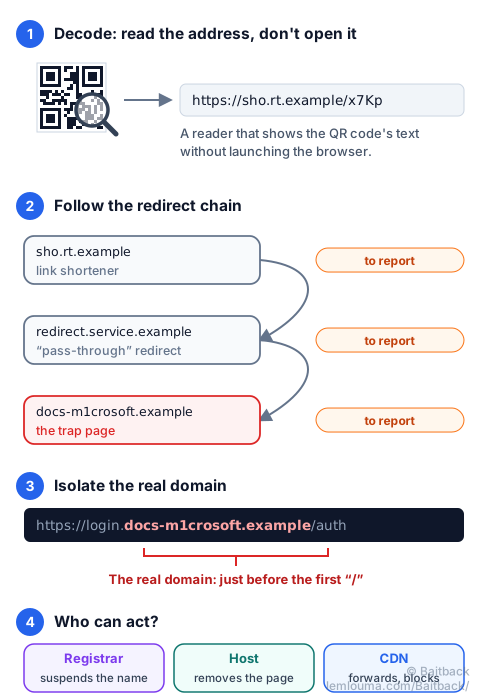
To analyse a quishing campaign, the first step is to turn the QR code into text, without ever visiting the page. There are several ways:
- The phone's camera usually shows the address before opening it. We read it, we don't tap.
- A QR code reader app set to display the text without opening the browser.
- On a computer, we take a screenshot of the code and have it read by an offline decoder, for example the free tool
zbarimg:
$ zbarimg capture.png
QR-Code:https://sho.rt.example/x7Kp
We now have an address like any other. We keep it carefully: it is the evidence.
Identifying the domain and the infrastructure
A web address reads a bit like a postal address written backwards. The name that matters, the domain, sits just before the first “/” after the https://. Everything to its left can be chosen freely by its owner.
https://login.docs-m1crosoft.example/authHere, the domain is docs-m1crosoft.example, not Microsoft. The word “login” at the start proves nothing. Same trap with microsoft.com.verification.example: the real domain is verification.example. Some domains go further and use letters from other alphabets that look like ours: see Punycode and homographs: when a fake domain looks like the real one.
Once the domain is found, we look for who can act. Three players come up all the time:
- The registrar is the domain name's registry office: the company it was bought from. It can suspend the domain, which cuts off every page that uses it. We find it with an RDAP or WHOIS lookup on the domain, which also gives its creation date: a domain created three days ago for a “bank” is a very bad sign.
- The host is the building's owner: the company whose server displays the page. It can remove the page or shut the server down.
- The CDN (such as Cloudflare) is the reception desk in front of the building: it serves the page in place of the server and hides its real address. It accepts reports, can display a warning and forwards the complaint to the host.
What to do when the QR code leads to several domains?
This is very common: the QR code does not lead straight to the trap page, but to a chain of redirects. A link shortener, then a legitimate service misused to redirect elsewhere, sometimes an “Are you human?” check, and finally the fake sign-in page.
Each link in the chain has its own owner, and each one can be reported:
- The final page first: its domain (to the registrar) and its server (to the host or the CDN).
- The first link next, the one written in the QR code. It is a weak point for the scammer: a printed or sent QR code can no longer be changed. If that first link is cut, all the codes already distributed become useless.
- The intermediaries last: a link shortener usually blocks abusive links very quickly, and a legitimate site used as a springboard has every interest in knowing about it.
We keep a record of the whole chain, with the date and time: scammers often change the final destination, and a dated report helps the teams that receive it.
Reporting the campaign with Baitback
A QR code does not make the email disappear: the message was sent by a server, which belongs to a host. We paste the email's full source into Baitback: the tool finds the sending server, its host and its abuse address, checks SPF, DKIM and DMARC, then prepares ready-to-send reports. To understand what those header lines tell us, see How an email travels from sender to recipient.
The address decoded from the QR code is also reported to the registrar, host or CDN identified above, and to the browser protection platforms that Baitback lists (Google Safe Browsing, Microsoft, Netcraft…). Within a few hours, the page can be blocked for millions of users.
What if we already scanned and typed our password?
No panic, but no delay either. From a trusted device, we change the password of the account concerned, use the “sign out of all sessions” option when it exists, and alert the IT department if it is a work account. Changing the password alone is not always enough: the guide on AiTM attacks explains why.
- A QR code is just an address written in little squares: it deserves the same suspicion as a link.
- It often gets past filters, because it looks like an image rather than a link.
- It moves us from the protected computer to the phone, less monitored and with a smaller screen.
- We decode it to read the address, without opening it, then isolate the real domain, just before the first “/”.
- Every link in the chain (domain, server, redirects) can be reported, and so can the email itself.