AiTM: when phishing steals your session, not just your password
For a long time, the advice was simple: “turn on two-factor authentication, and phishing can no longer touch you.” That advice is still excellent, but it is no longer enough. A family of attacks called AiTM, for Adversary-in-the-Middle, steals much more than a password: it steals the session that is already open. Let's see how, in simple terms.
What is an “Adversary-in-the-Middle” attack?
In classic phishing, the fake site is a copy: a page imitating the bank's or the mailbox's, which keeps the password typed into it. The attacker then has to use it himself, later.
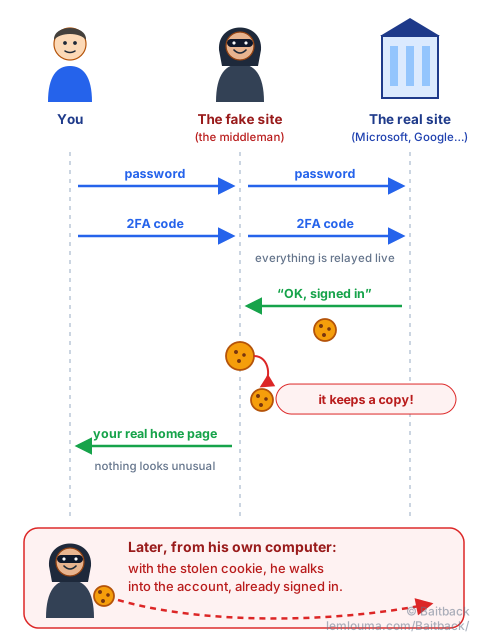
In an AiTM attack, the fake site is no longer a copy: it is a middleman. Picture a fake clerk sitting in front of a bank's real counter. We hand over our papers, he passes them to the real clerk, brings back the answer, and so on. Everything goes normally… except that he photocopies everything along the way.
Technically, the fake site displays the real sign-in page, which it fetches live from the real service. “Turnkey” kits do this work and are rented like a subscription, putting the technique within reach of any scammer.
Stealing the session cookie: the festival wristband
When we sign in to a site, we don't retype our password with every click. The site gives us a session cookie, a small token stored in the browser, which says: “this person has already identified themselves.”
It is the equivalent of a festival wristband. At the entrance, we show our ticket and our ID. After that, we only show the wristband. Nobody checks the ticket again at every concert.
The AiTM attack consists of getting a copy of that wristband. The attacker then needs neither the password nor the code: he pastes the cookie into his own browser and finds himself in the account, already signed in. That is why changing the password afterwards is not always enough: the stolen wristband may remain valid until the session is closed.
Why some two-factor methods are not enough
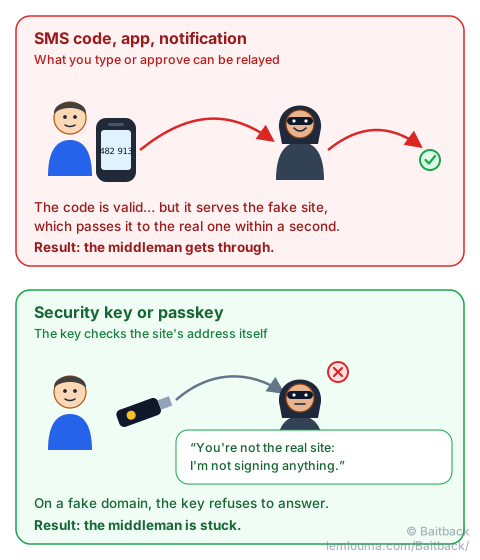
Two-factor authentication (2FA) adds a second proof to the password: a code received by SMS, an app code, a notification to approve on the phone. Against a copied site, it is formidable. Against a middleman, much less so: the code is valid, it is simply typed in the wrong place, then relayed to the real site within a second.
The methods that resist are the ones that check the site's address themselves: physical security keys and passkeys. At sign-in time, the key looks at which domain it is talking to. If it is not the real one, it simply does not answer. A human can mistake one site for another; the key is not fooled by a resemblance.
How to recognise an AiTM infrastructure
The trap of AiTM is that we see the real page: real logo, real layout, sometimes even our company's background and our email address already filled in. The content gives nothing away. So we have to look elsewhere:
- The address in the browser bar. It is the only thing the middleman cannot imitate perfectly. A Microsoft sign-in page on
login.microsoftonline.com.secure-auth.exampleis not at Microsoft: the real domain issecure-auth.example. To read a domain correctly, see the guide Quishing: when phishing hides behind a QR code, and for deceptive letters, Punycode and homographs. - A password manager that offers nothing. It fills in fields based on the domain, not the appearance. If it stays silent on a page it usually knows, that is an alarm bell.
- A detour before the page: an “Are you human?” check, one or more redirects, a link received by email or by QR code.
- A brand-new domain, created a few days ago, often behind a CDN, or hosted on a free web page platform.
What evidence to collect for the report
For a host or a registrar to act quickly, we need to give them verifiable facts. We gather, without ever re-entering credentials on the page:
- the full address of the page, and the whole redirect chain that leads to it;
- a screenshot showing both the page and the address bar;
- the date and time of the observation (these infrastructures change fast);
- the full source of the email that contained the link;
- the registrar and creation date of the domain, the host or CDN serving the page;
- the impersonated brand: Microsoft, Google, a bank… Their security teams accept this kind of report.
Reporting the infrastructure with Baitback
The campaign almost always starts with an email. We paste its full source into Baitback: the tool finds the sending server and its host's abuse address, follows the redirects of the links in the message and flags what looks wrong at the destination: a brand look-alike domain, a recently created domain, free hosting, a blacklisted domain. It then prepares ready-to-send reports.
For the page itself, we send the collected evidence to the registrar, the host or the CDN, and to the platforms that Baitback lists (Google Safe Browsing, Microsoft, Netcraft…). To understand why an email of this kind can pass every technical check, see An email can lie… even when the checks say “OK”.
If we typed our credentials on an AiTM page
The password is no longer enough, we also need to take back the wristband:
- change the password from a trusted device;
- use “sign out of all sessions” or, at work, ask the IT department to revoke the sessions;
- check that no new two-factor method has been added;
- check the mailbox rules: attackers often add a rule that forwards or hides certain emails.
- An AiTM site doesn't imitate the sign-in page: it relays the real one, live.
- It steals the session cookie, the “wristband” that saves us from signing in again: password and code become unnecessary to the attacker.
- Codes (SMS, app, notification) can be relayed; security keys and passkeys check the domain and resist.
- The only reliable clue is the address: a silent password manager is an excellent alarm bell.
- After typing credentials, we change the password and close all sessions.