How to find a host's abuse@ address?
Once the right server is identified, you still need to know who to write to in order to get it taken down. The good news: an address almost always exists, made exactly for this. The less good news: it's not always easy to find on the first try. Here's the method, step by step.
Why abuse@ addresses exist
In 1997, RFC 2142 set a convention still used today by nearly every host and network operator: every organization running machines connected to the Internet must expose an abuse@ mailbox to receive reports of abusive use (spam, hacking, phishing…), alongside other standard mailboxes like postmaster@ or webmaster@. This isn't just a habit: it's a standard, which explains why it works so widely, from small hosts to the largest global operators.
Identifying the operator: from IP to ASN
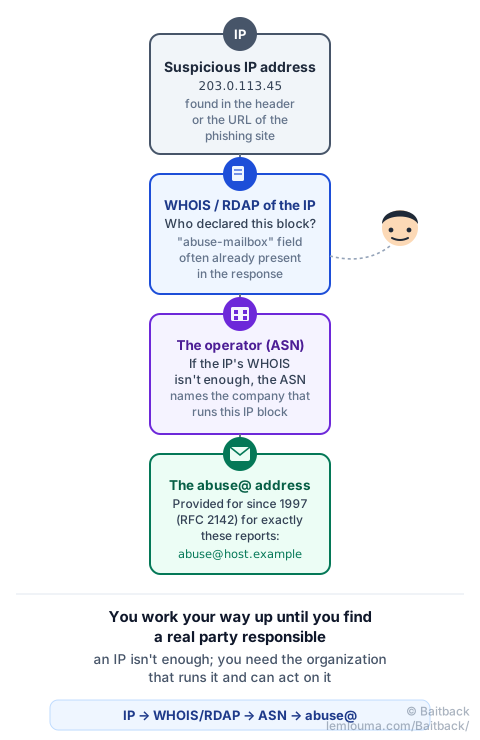
Everything starts from an IP address: the one of the server hosting the phishing page, or the one found in the Received line of an e-mail (see how to find it in the header). From there, the method always follows the same path:
- WHOIS or RDAP of the IP: a simple
whois 203.0.113.45command, or an online RDAP site, shows which organization declared that address block. The answer very often directly includes anabuse-mailboxorOrgAbuseEmailfield: that's the fastest answer, when it's present. - The ASN, if the IP's WHOIS isn't enough: every IP address block is tied to an ASN (Autonomous System Number), a sort of ID number for the network operator running it. Tools like bgp.he.net can trace the ASN from the IP, then the organization tied to it.
- Checking the contact: once the organization is identified, search "organization name + abuse" or check its support page: most large hosts document their reporting procedure.
Making sure the contact is the right one
Guessing an abuse@ address from just the phishing site's domain name is a common mistake: abuse@secure-login.example probably doesn't exist, since that domain belongs to the scammer, not the host. The right abuse@ address is that of the organization that owns the server (found via the IP, not via the fake site's domain name). For a domain to be suspended rather than a server to be cut off, you need a different address: the registrar's (see who controls what between registrar, host and CDN).
When the abuse@ address isn't obvious
WHOIS doesn't always answer clearly. Three situations come up often:
- Large cloud hosts (AWS, OVH, Azure, Google Cloud…) frequently replace the e-mail address with a dedicated web form, sometimes even required for the report to be handled quickly.
- The domain's registrar sometimes exposes, via RDAP, a direct "report abuse" link rather than a classic e-mail address.
- Silence, or a refusal: some operators, especially abroad, respond slowly or not at all. In that case, the national CERT or the country's official platform remains an option: in France, for example, PHAROS.
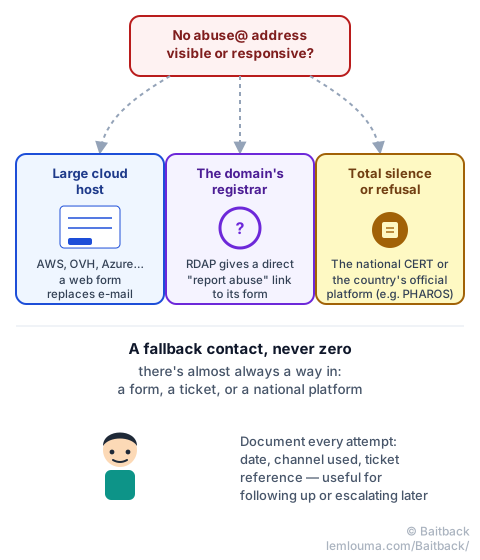
Keep a record of every attempt: date, channel used (e-mail, form, ticket), and reference number if there is one. That's what lets you follow up usefully, or escalate to the next level without starting from scratch.
Preparing your report
Once you've found the right address, the report itself should stay easy for the recipient to handle:
- the specific element involved: the IP address for a host, the domain name for a registrar;
- the exact URL of the phishing page, or the full header if the report starts from an e-mail;
- the date and time of observation, with the time zone;
- defanged links, like
hxxps://secure-login[.]example, so no accidental click happens while reading.
- Since 1997 (RFC 2142), the abuse@ mailbox is the expected standard at every network operator.
- The classic path is IP → WHOIS/RDAP → (ASN if needed) → abuse@ address.
- The valid contact is that of the organization that owns the server (via the IP), not one guessed from the fake site's domain name.
- Large cloud hosts often use a web form rather than an e-mail address.
- Without a response, the national CERT or an official platform remains an option.
That's exactly what Baitback automates: starting from an e-mail or a link, the tool traces the server involved, its operator, and its exact report address, then prepares a ready-to-send message.
To go further: registrar, host, CDN: who can actually act, or the full anatomy of an effective report.