Registrar, host, CDN: who can actually act?
Faced with a phishing site, one question keeps coming up: who do you write to so it stops? The answer depends on a detail that's often overlooked: a site never has just one technical party responsible for it, but several, each with a different power. Writing to the wrong recipient means waiting a week for an action the right contact could have done in an hour.
What is a registrar?
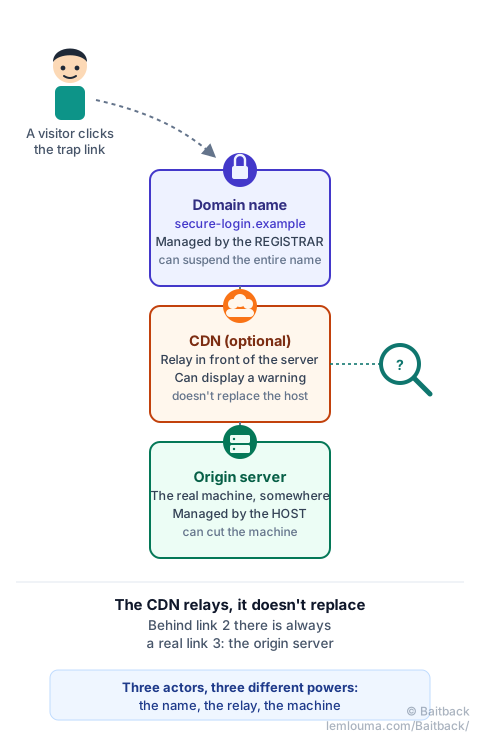
The registrar is the organization from which the domain name was bought, such as secure-login.example. It's the one that registered that name with the domain's registry (.com, .fr, .net…) and can, on report, suspend it: the name then stops working, wherever it points. Every link already sent out in a phishing campaign becomes useless at once, even if the server behind it is still running.
What is a host?
The host owns the physical or virtual machine running the site: the server. It can cut that machine, or remove the specific page if the rest of the server is legitimate (the case of a hacked site). Cutting the hosting removes the page immediately, but doesn't stop the scammer from pointing their domain to another server within minutes.
What is a CDN?
A CDN (Content Delivery Network) is a network of intermediary servers, such as Cloudflare, Akamai or Fastly, placed in front of the real server. It speeds up delivery, filters some unwanted traffic, and above all: it masks the origin server's real IP address from a simple visitor's view. A CDN can display a warning to visitors or block access to a page, but it can't delete the site: it only relays it on behalf of its true owner.
Who controls what?
| Actor | What they own | What they can do |
|---|---|---|
| Registrar | The domain name | Suspend the entire name |
| Host | The server (the machine) | Cut the machine or remove a page |
| CDN | The relay in front of the server | Warn or block visitors, forward the complaint |
These three actions complement each other rather than replacing one another. Cutting the server without touching the domain lets the scammer rebuild elsewhere within minutes; suspending the domain without acting on the server leaves the machine active for other names.
Concrete example: a phishing site behind Cloudflare
A site imitates a bank's login page at the address https://secure-login.example. A WHOIS lookup of its IP address returns... Cloudflare. At first glance, you might think Cloudflare hosts the site. That's almost never the case: Cloudflare (or an equivalent CDN) merely acts as an intermediary. The real server, the one actually holding the fake page, is somewhere else, at a host that doesn't appear anywhere in this first WHOIS lookup.
Why reporting only to the CDN may not be enough
A report sent only to the CDN can get a fast reaction: Cloudflare, for example, offers a dedicated form at abuse.cloudflare.com and can display a security warning to visitors. But as long as the real server keeps running, the scammer can pull the site off the CDN and keep serving it directly, or move it behind another CDN. The CDN slows things down, it doesn't stop them. For a lasting takedown, you also need to trace back to the actual host, and notify the domain's registrar.
How to identify the real host
Several clues often make it possible to find the origin server behind a CDN, without any specialized tool:
- DNS history: DNS history services sometimes keep the IP addresses a domain used before it moved behind a CDN. If the site is old or recently changed its setup, the old IP may still be there.
- A forgotten subdomain: large organizations turn on the CDN for the main site, but sometimes forget a secondary subdomain (
mail.,ftp.,dev.,webmail.) that still points directly to the real server. - Headers and the certificate: some misconfigured servers respond differently when reached directly than through the CDN, or expose a certificate tied to a different name.
- The e-mail header: if the phishing came by e-mail, the sending server's IP address (see how to read a full header) sometimes belongs to the same host as the site, even if the site is protected by a CDN.
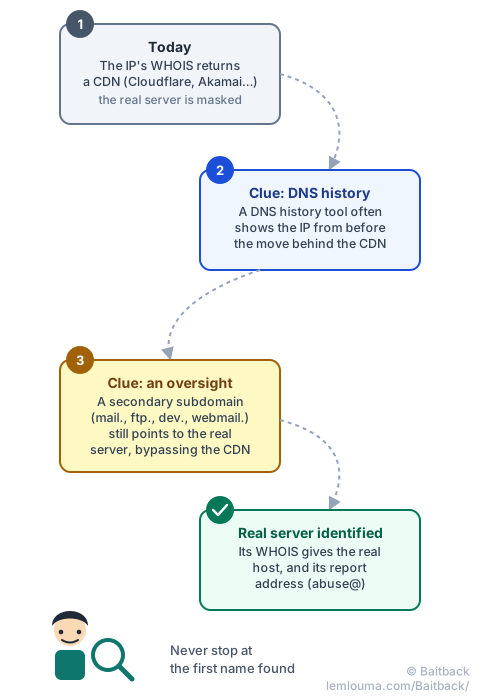
When none of these clues is enough, the CDN remains a mandatory stop: its abuse form allows reporting the page, and some CDNs forward the complaint themselves to the real host, whom they know.
Building your report
Once the right actor is identified, an effective report stays short and verifiable: the exact address of the page (not just the domain name), a screenshot or the full header if the vector is an e-mail, and the date and time of observation. You write to the CDN for an immediate warning, to the registrar to cut the name, and to the host to cut the machine — each for what concerns them, rather than sending everything to everyone at once.
- The registrar manages the domain name and can suspend it entirely.
- The host manages the server and can cut the machine or remove a specific page.
- A CDN doesn't host the site: it relays it, masks its real IP, and can warn visitors without being able to delete it.
- A WHOIS lookup returning a CDN is almost never the end of the investigation: you have to look for the real server behind it.
- DNS history, forgotten subdomains and e-mail headers are good starting points to find it.
That's exactly what Baitback does: starting from an e-mail or a link, the tool traces the sending server, identifies the real host even behind a CDN, and prepares report messages addressed to each actor involved.
To go further: analyzing a phishing case from message to infrastructure, finding a host's abuse@ address, or understanding the role of DNS.