Phishing: the psychology behind 50 pretexts that work
The days of emails riddled with spelling mistakes and stories about generous princes are over. Today, cybercrime is first and foremost a matter of psychology. Everyone's habits, fears, reflexes and lack of time are studied to build the most effective traps of everyday digital life. The most dangerous attacks no longer try to break complex systems: they break trust.
This guide catalogs 50 pretexts, grouped by family, along with the psychological mechanism each one exploits and a concrete example of the message that might show up on screen.
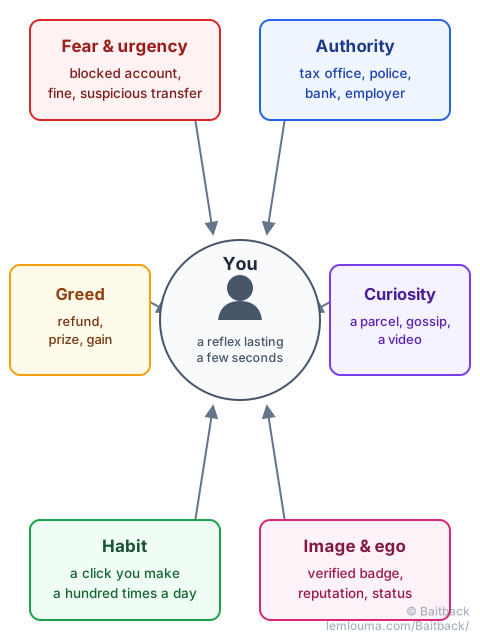
Six levers, one goal: reflex before reflection
Behind the variety of pretexts, you almost always find one of these six springs:
- Fear & urgency: a blocked account, a fine, a suspicious transfer. Time pressure aims to make you act before you think.
- Authority: the message appears to come from an administration, a bank or a manager. Few people argue with an order that looks legitimate.
- Greed: a refund, a prize, a bonus. The lure of gain lowers your guard.
- Curiosity: a mystery parcel, a supposedly compromising video, a “priority” message. Hard to resist the urge to find out.
- Habit: signing in to email, clicking “unsubscribe”, accepting terms of service… gestures done on autopilot, dozens of times a month.
- Image & ego: the fear of losing a badge, a reputation, a social status pushes people to react quickly to protect it.
A single message often combines several levers at once: a fake bank alert, for example, adds fear (account under threat), authority (it supposedly comes from the bank) and urgency (24 hours to act).
Security & account access: playing on fear
The largest family: anything that directly threatens an account or a digital identity.
| Pretext | Example message received |
|---|---|
| Credential theft | “Your Microsoft 365 session has expired. Sign in again to keep receiving your emails.” |
| Supposedly compromised password | “Security alert: your password was exposed in a public data breach. Click here to reset it.” |
| Two-factor bypass | “Verification required: enter the code you just received by text on this page to confirm your identity.” |
| Fake suspicious sign-in | “Unusual sign-in detected from abroad (IP 192.x.x.x). If this wasn't you, block access here.” |
| Threat of closure within 24 hours | “Urgent: your account will be permanently suspended in 24 hours unless you take action.” |
| Forced identity check | “Compliance: your account is restricted. Please provide proof of identity within 48 hours.” |
| Fake data leak | “Your credentials are circulating on the dark web. Click to check if your email address was affected.” |
| Fake security update | “Critical update required for your antivirus. Download the patch here.” (the link installs spyware) |
Money & banking: playing on financial stress
Nothing gets a faster reaction than money moving, whether real or invented.
| Pretext | Example message received |
|---|---|
| Fake outgoing transfer | “A transfer of $850.00 to a third party has been initiated. Click here to cancel it if this wasn't you.” |
| Fake refund | “Good news! An overpayment of $142.50 is waiting for you. Confirm your bank details to receive the transfer.” |
| Supposedly expired card | “Your saved card is about to expire. Update your details to avoid any interruption of service.” |
| Fake loan approval | “Your personal loan application for $15,000 has been pre-approved. Complete your file online.” |
| Fake unpaid invoice | “Reminder: invoice #84920 is overdue. Pay immediately to avoid late fees.” |
| Crypto recovery-phrase theft | “Network migration: sync your wallet immediately using your 12-word recovery phrase.” |
| Fake rejected direct debit | “Your latest direct debit was rejected. Update your payment method to avoid any dispute.” |
| Fake bank-detail change | “Account update: please confirm your new bank details to keep receiving your benefit payments.” |
One pretext keeps coming back: a precise amount, neither round nor huge ($142.50, $850.00). A realistic figure feels more believable than a round number, and makes people more likely to click just to check.
Public services & government: playing on authority
Few people argue with a message that appears to come from an administration.
| Pretext | Example message received |
|---|---|
| Fake tax refund | “Tax Office: after recalculating your taxes, you are due a refund of $312.00. Click here.” |
| Fake health-card renewal | “Health Insurance: your new health card is ready. Pay a $2.90 postage fee to receive it.” |
| Fake unpaid fine | “Traffic Authority: you have an unpaid parking fine of $35.00. Settle it before the surcharge applies, via this link.” |
| Fake license/registration anomaly | “Road Safety: your file shows an administrative anomaly. Sort out your situation here.” |
| Fake court summons | “Summons: you are ordered to appear over a digital offence. Please review the attached document.” |
| Fake state grant or aid | “Energy support: you are eligible for a one-off $200 grant. Request your payment.” |
This is part of what explains the success of official reporting platforms — such as PHAROS in France — for filing a complaint: authority inspires trust in both directions, for the scammer who fakes it and for the service that genuinely carries it.
Deliveries & e-commerce: playing on routine
Almost everyone is waiting for a parcel at some point or another: the ground is always favorable.
| Pretext | Example message received |
|---|---|
| Fake customs fee | “Your parcel is held at customs. Pay a $1.99 postage fee to release the shipment.” |
| Fake incomplete delivery address | “Incomplete address. We cannot deliver your parcel. Please update your details.” |
| Fake failed hand delivery | “Delivery notice: our courier could not reach you. Reschedule a delivery to your address.” |
| Fake expensive order | “Order confirmation: smartphone purchase ($1,299.00). If you didn't place this order, cancel it here.” |
| Fake mystery parcel | “An unclaimed parcel in your name is waiting at the depot. Claim it before it is destroyed.” |
| Fake parcel tracking | “Your order is on its way. Click the link to track your courier in real time.” |
Company & HR: playing on hierarchy
At work, a message that appears to come from HR or management gets immediate trust — and an urge to reply quickly so as not to cause a problem.
| Pretext | Example message received |
|---|---|
| Fake payslip | “HR: your payslip for the month is available online. Sign in to your employee portal.” |
| Fake leave arbitration | “Leave request: an arbitration is needed on your booked days off. Confirm your request.” |
| Fake internal survey | “Management: take our anonymous satisfaction survey for a chance to win a gift card.” |
| Fake urgent e-signature (DocuSign) | “A confidential document ‘Contract_2026.pdf’ requires your urgent electronic signature.” |
| Fake shared cloud file | “A colleague shared a secure file with you. Click to access the document.” (the link asks again for your email password) |
| Fake instruction from management | “VERY URGENT – CONFIDENTIAL: I need you to run a check on this link right away.” |
| Fake work-tool migration | “IT department: we're moving to the new version of Teams. Activate your account within 24 hours.” |
Social media & messaging: playing on image and ego
A social account isn't just a tool: it's a public image, and losing it feels almost as scary as losing money.
| Pretext | Example message received |
|---|---|
| Threat to a verified badge | “Your verification badge is about to be removed. Confirm your details to keep it.” |
| Fake copyright violation | “Your account has infringed copyright on a post. Dispute it or it will be removed.” |
| Voyeuristic curiosity | “Did you see what they said about you in this video? Click quick to see the clip!” |
| Fake mass reporting | “Several users have reported your profile. Verify your account to avoid a ban.” |
| Fake priority message | “You've received a priority message from a recruiter. Sign in to read it.” |
| Fake hacked friend | “Hey, it's Alex! I'm locked out of my account, can you click this and give me the code you get?” |
Everyday subscriptions: playing on inattention
It's the most automatic gestures that hide the trickiest traps.
| Pretext | Example message received |
|---|---|
| Fake failed renewal | “Your payment was declined. Your subscription will be suspended tonight unless you update it.” |
| Fake storage full | “Your storage is 99% full. Your photos will stop being backed up. Increase your quota.” |
| Fake introductory offer | “Enjoy 3 months free on our Premium plan. Start your no-commitment trial.” (a card is requested right at sign-up) |
| Fake terms-of-service update | “Terms of service: please accept the new terms of use to keep using the service.” |
| The fake “Unsubscribe” button | “Don't want our offers anymore? Click “Unsubscribe” to be removed from the list.” |
| The fake “Report as spam” button | “Does this email look suspicious? Click the “Report as spam” button below to let us know.” |
The last two pretexts are especially nasty. The very gesture meant to clean up your inbox or flag abuse is itself the trap: the click confirms to the scammer that a real person reads this address, or it directly triggers a malicious script. Faced with a suspicious message, it's better to report it from your own mail client (the “junk”/“spam” button in your email app) than from a button supplied by the email itself.
Windfalls, opportunities & crypto: playing on greed
The modern version of the extraordinary-windfall scam, more understated but just as effective.
| Pretext | Example message received |
|---|---|
| Fake overpaid remote job | “Hiring: remote-work offer at $500 a day. No experience required, apply here.” |
| Fake inheritance or windfall | “Notary: you have been named beneficiary of an unclaimed estate. Get in touch via this link.” |
| Fake crypto airdrop | “500 free tokens given to the first 1,000 people. Connect your wallet to claim.” (the wallet is emptied automatically) |
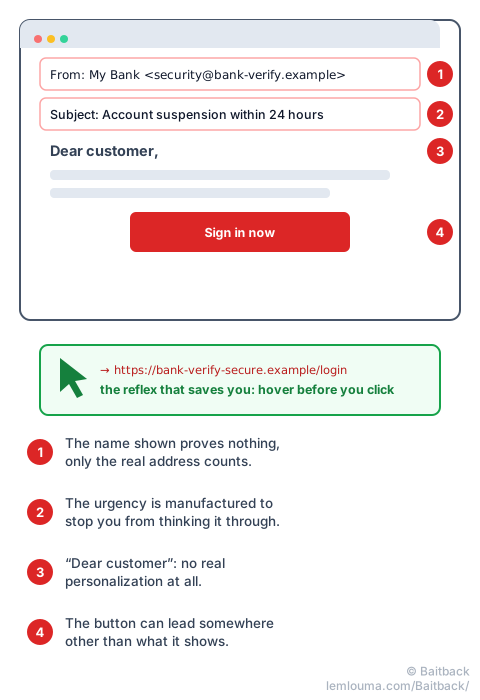
The reflex that works every time
Faced with fear, urgency or habit, one single gesture is usually enough: before clicking, hover the cursor over the link (or press and hold on a smartphone) to reveal the real destination address, without ever clicking on it. The name shown proves nothing; the address that appears on hover does.
A legitimate message never asks you to choose between acting within the minute and losing your account, your money or your parcel. That time-pressure blackmail is, on its own, enough of a warning sign to stop and check through another channel (the official site typed directly, or a call to the usual number).
- Almost every pretext comes down to six levers: fear, authority, greed, curiosity, habit, image.
- A single message often combines several levers at once to maximize its chances.
- The sender name shown proves nothing: it is written by the sender themselves.
- The “unsubscribe” and “report as spam” buttons in a suspicious email can be the trap itself.
- Hovering over a link before clicking reveals its real address: the simplest reflex, and the most effective.
Recognizing the pretext is a first step. Understanding how the message gets through despite the filters (see the guide Phishing: how scammers get their emails through) and knowing how to act once the doubt is confirmed are two others. That's where Baitback comes in: paste in the suspicious email, and the tool finds its sending server, its host and its abuse contact, then prepares ready-to-send messages. To go further, Baitback is available directly on the tool's home page, and the guide Reporting a phishing attack: from report to takedown details what happens after you file a report.