Reporting a phishing attack: from report to takedown
Finding the host or registrar of a phishing site (see who can actually act and how to find their abuse@ address) is only half the journey. You still need to write a report someone can act on within minutes, understand what happens once it's sent, and follow the case until the site truly disappears. This guide covers all three: reporting well, knowing what to expect, and staying on it until the takedown.
Anatomy of an actionable report
An abuse report is handled by a person, often with dozens of others to process the same day. The more verifiable elements it contains up front, the faster it rises to the top of the pile. Seven pieces of information come up almost every time:
- The exact URL of the phishing page, not just the domain name: a single address can host dozens of different pages.
- The domain involved, for the registrar.
- The server's IP address, for the host (see how to trace it to an abuse@ address).
- The full headers, if the vector is an e-mail: that's where the real trace lies, not in the displayed sender.
- The date and time of observation, in UTC or with the time zone specified, to avoid any ambiguity for whoever receives the report from another country.
- A screenshot of the page, useful if it disappears before anyone gets to check it.
- A factual description of the attack: what's being impersonated, what's being asked of the victim (credentials, card details…), without assumptions or accusations.
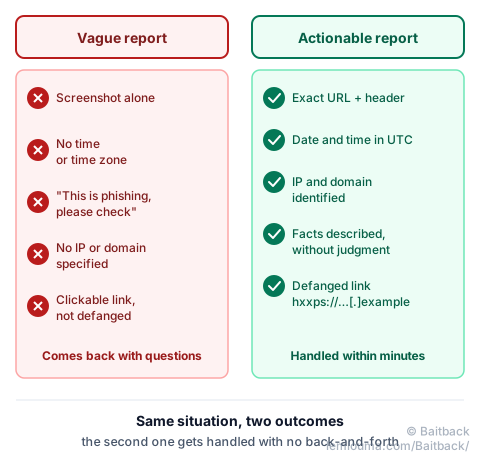
The most common trap is the overly vague report: "this site is phishing, please act." Without a precise URL or timestamp, whoever receives the message first has to go dig up information the reporter already had in front of them, which delays everything, or the report gets filed away if it's judged too vague to verify.
That's exactly what Baitback prepares: starting from an e-mail or a link, the tool gathers these seven elements automatically and drafts a ready-to-send message, addressed to the right recipient.
What happens after an abuse@ report is sent?
A well-built report rarely vanishes into the void. At most hosts, it follows a fairly similar path, even if it doesn't always end the same way.
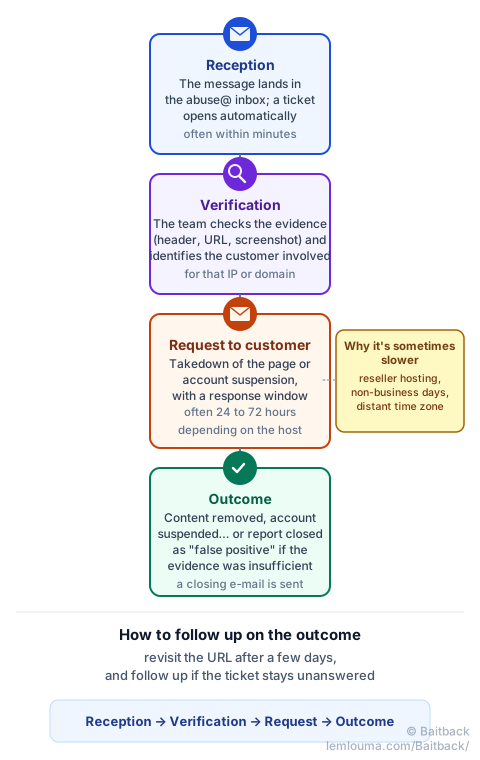
A host almost never cuts a server on the report alone: it first checks the evidence, then identifies which of its customers is involved (the host rents the machine to a third party; it's almost never the site's author itself). It's that customer who is first asked to remove the content or suspend the account, with a response deadline. If the customer doesn't respond or doesn't cooperate, the host may cut it themselves, per their own terms of service.
False positives exist: a legitimate site wrongly flagged, a test page, a security tool mistaken for a threat. That's why verification happens before any action, and why a report with solid evidence (figure 1) gets handled faster than a bare suspicion.
Some reports take longer than others: a host that's actually just a reseller has to relay the request to the real operator; a ticket opened on a Friday evening waits for the next business day; a host in a distant time zone answers with the corresponding delay. None of that means the report got lost: you revisit the URL after a few days, and follow up politely if the ticket remains unanswered past the stated deadline.
From report to takedown: following an infrastructure over time
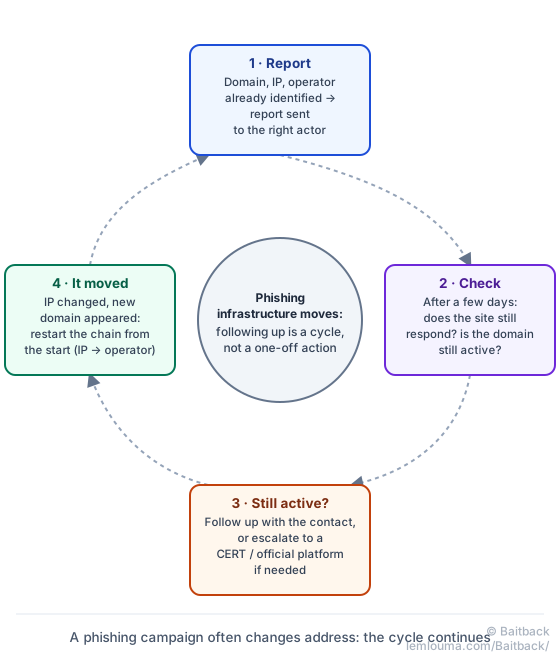
A single report is sometimes just one step. A phishing infrastructure can survive a first takedown by moving: new IP address, new domain, new host. The work doesn't stop once the report is sent.
The method stays the same at every stage: identify the domain, identify the server's IP address, identify the operator managing it (see who controls what between registrar, host and CDN and the chain IP → WHOIS/RDAP → ASN → abuse@), then report to each what concerns them.
What to do if the site stays active?
A few days with no change doesn't mean the report failed: follow up on the existing ticket by citing its reference, rather than opening a new one. If the silence persists beyond a reasonable delay, an official platform (in France, PHAROS, as one example — each country has its own) or a national CERT remains a complementary recourse.
What to do if the domain changes IP address?
A domain that suddenly points to a new IP has probably changed hosts, whether on purpose (to dodge a report) or not. The identification chain has to be redone entirely for that new IP: new WHOIS, new operator, new abuse@ address. The domain itself often remains the most stable target: a report to the registrar keeps its value even if the server has moved.
What to do if a new domain appears?
Active campaigns often reuse the same page template, sometimes the same host, under a new domain name. Spotting a family resemblance (same layout, same server, same URL structure) lets you anticipate what's next rather than starting from scratch with every new variant.
- An actionable report contains the exact URL, the domain, the IP, the headers, the time in UTC, a screenshot and a factual description.
- Once received, the host checks the evidence, identifies the customer involved, then asks them to remove the page or suspend the account.
- A 24-to-72-hour response window is normal; follow up rather than give up.
- Phishing infrastructure can move after a takedown: following up (status, IP, new domains) is a cycle, not a one-off action.
Baitback handles each of these steps: it prepares a complete, actionable report, addressed to the right actor, so the only thing left to do is send it.
To go further: registrar, host, CDN: who can actually act, finding a host's abuse@ address, or analyzing a phishing case from message to infrastructure.