Anatomy of a phishing kit: what happens behind the fake page
A phishing page is almost never written by hand. In the vast majority of cases, it comes out of a ready-made archive, a phishing kit: a .zip file that gets downloaded, dropped onto a rented or hacked server, and becomes operational within minutes. Here's what's under the hood, from the facade to the stolen data.
A toolkit set up in five minutes
The kit's first piece is the facade: a copy of the HTML, CSS and JavaScript code of a real site (a bank, a messaging service, the tax administration…). Grabbing this code is easy; any browser lets you save it. The kit's job is to make it functional: the input fields are wired to a script that captures everything typed into them, instead of checking a password against the real service.
To survive longer, the kit often hides its own workings. The script that captures the data is frequently encoded (in Base64, for example), which makes it unreadable at a glance and harder for a crawler or an automated security scanner searching the code for known keywords to spot. This isn't strong encryption: a human who takes the time to decode the script gets there without difficulty. It's mainly a way to buy a few extra hours or days before being detected.
What the page checks while the victim types
A well-built kit doesn't just record anything. It validates the input live, exactly as the real site would, for two reasons: to give the illusion of a serious form, and above all not to clutter the attacker with unusable data.
- The e-mail format is checked down to the character (presence of an "@", a valid domain…).
- The card number goes through the Luhn algorithm: a simple mathematical formula that checks whether a sequence of sixteen digits could correspond to a real card, without knowing anything about the card itself. A randomly made-up number almost always fails this test; the kit rejects the input and asks for the card again, all while giving the impression of a rigorous site.
The most effective, and most discreet, part concerns two-factor authentication (MFA / 2FA). Many recent kits display, right after the password is entered, a loading screen along the lines of "Verifying…". Behind the scenes, meanwhile, the attacker logs in live to the real site with the credentials that were just stolen. The real site then sends a real code by SMS to the victim, who types it into the fake page in full confidence: the kit immediately relays it to the attacker, who in turn enters it on the real site. The victim sees nothing but a screen spinning a bit too long; the attacker has just obtained full access, one-time code included.
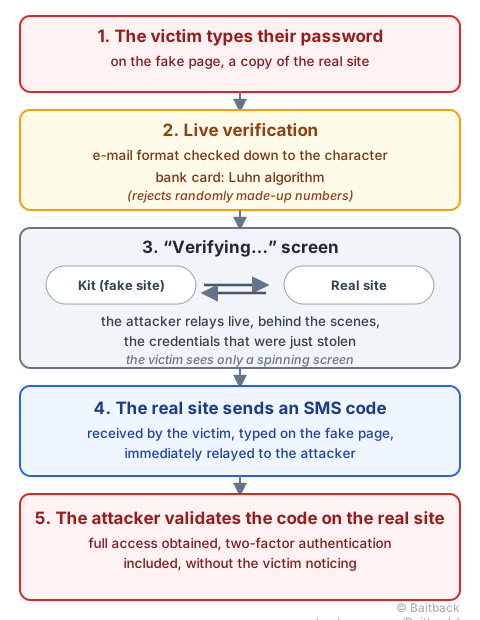
This mechanism remains a manual setup, to be validated by hand by the attacker. Much more automated versions exist, where a server inserts the fake page between the victim and the real site with no human intervention at all: that's the subject of the AiTM: when phishing steals your session, not just your password guide.
Where the data really goes: three exit doors
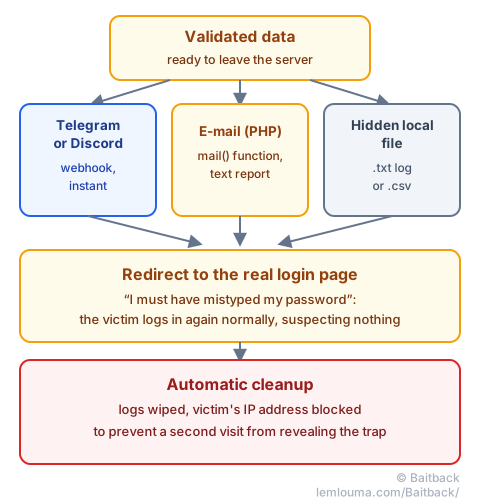
Once validated, the data has to leave the server to reach the attacker. Three channels keep coming up in current kits:
- Telegram or Discord webhooks: the most widely used method today. The kit sends a simple request to a private Telegram or Discord channel, and each stolen credential appears instantly in a conversation, on the attacker's phone. Fast, free, and hard to spot without looking at the page's source code.
- Sending e-mails: the kit uses PHP's
mail()function to send each input as a small text report, to an address chosen by the attacker. - Local log files: more rudimentary, the kit writes each stolen piece of data into a hidden file (
.txtor.csv) directly on the server, which the attacker comes back to retrieve later.
These three channels aren't mutually exclusive: many kits combine an instant webhook to be notified right away, and a backup file in case the webhook stops working.
The curtain falls: redirect and cleanup
Once the data is gone, the fake page doesn't just stop dead: it redirects the victim to the real login page of the impersonated service (for example login.live.com), often with a discreet error message. The intended effect is precise: the victim thinks they must have mistyped their password, retypes their credentials on the real site, logs in normally… and suspects nothing.
Some kits go further and protect themselves after a first successful pass: wiping logs that could give away how they work, or blocking the victim's IP address so that a second visit (for example, by a researcher coming back to examine the page) lands on a blank page or an error, instead of the full trap.
How such a well put-together setup eventually falls apart
Despite all this care, kits leave exploitable traces. The most common is a server misconfiguration: an open directory (directory listing), which lets anyone browse the site's folder and, with it, download the kit's .zip archive exactly as it was dropped. Once this archive is in hand, a researcher often finds, in plain text or barely encoded, the credentials that really matter: the Telegram bot's token, the Discord channel ID, or the receiving e-mail address.
These credentials don't concern just one page: the same bot token is often reused across several campaigns by the same attacker. Reporting it to Telegram or Discord can therefore cut off an entire series of sites at once, far beyond the one that was found. It's the same principle as for e-mail-sending infrastructure, detailed in the Analyzing a phishing case: from message to infrastructure guide: every element found is also a lever, and the server hosting the kit remains reportable to its host like any phishing page (see finding a host's abuse@ address).
Before getting that far, the first move is still to check the link that led to the page. By pasting the suspicious e-mail into Baitback, the tool follows the redirects, identifies the sending server and its host, and prepares the reporting messages directly, without needing to dig through the kit's code yourself.
- A phishing page almost always comes from a ready-made kit, cloned and then obfuscated to delay detection.
- Live verification (Luhn, e-mail format, MFA relayed in real time) serves to filter out unusable data and steal one-time codes.
- Stolen data most often leaves through a Telegram or Discord webhook, a PHP e-mail, or a local log file.
- The final redirect to the real site is meant to put the victim's suspicions to sleep.
- An open directory can hand over the kit's full archive, and with it, the credentials that let you cut off the attacker's entire infrastructure at once.