Autopsy of 3 real 2026 cyberattacks
Attackers no longer spend hours trying to guess a complicated password. It is far simpler to build a believable situation and let the victim open the door themselves. In September 2026 alone, three well-documented cases show just how refined these setups have become. Here is their autopsy, step by step, along with the trace each one leaves behind.
Case 1: the job offer that installs a spy
The scenario is almost mundane: a message on LinkedIn or by email offers a tailor-made, very well-paid position. To “move to the next step,” you just need to open the attached job description, or take a small technical test. This type of campaign, documented by several security vendors and linked to organized groups (including an operation nicknamed Contagious Interview, said to have hit more than 30,000 devices according to analyses published this summer), particularly targets developers and tech workers.
What happens once the file is opened:
- A believable setting: the message comes from a hacked account or a domain name almost identical to a real company's, letting it slip past the usual filters.
- An unbreakable container: the job description arrives in a password-protected ZIP archive, or an .ISO disk image. Without the password, the mail service's antivirus cannot check what is inside, and lets the file through.
- An invisible trigger: inside the archive is a file named, say,
Job_Description.pdf. It is not actually a PDF, but a Windows shortcut (.LNK) hiding an invisible command. - A key theft with no password needed: once the shortcut is opened, a quiet program copies the session cookies already stored in the browser. The attacker can then sign in to Slack, Gmail or social media without ever needing the victim's password or their two-factor code (MFA).
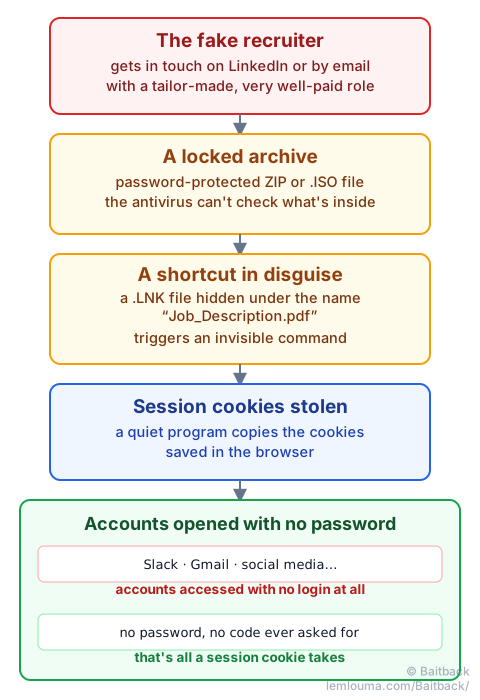
The trace: a locked archive fools the antivirus, not the servers. The message still passed through an identifiable sender and sending server, exactly as described in the guide Phishing: how scammers get their emails through. A stolen cookie grants temporary access, not permanent access: cutting the session remotely and changing passwords remains effective once the trick is discovered.
Case 2: the fake “Claude Max” giveaway, a window inside the window
In mid-September 2026, a page began circulating claiming that Anthropic, the maker of Claude, was celebrating 100 million users by giving away 10,000 free Claude Max subscriptions. No credit card is requested: just a sign-in with a Google account. The trap was documented by several security researchers, including Malwarebytes, just days before this guide was written.
The mechanics, carefully built:
- A false sense of security: the site reuses the real logo, the real colors, fake five-star reviews, and its footer links almost entirely to genuine Anthropic pages. The absence of any credit card request puts the victim at ease.
- A scheduled fake urgency: a counter shows a shrinking number of remaining spots. It is just a script running in the browser: it resets to the same number every time the page reloads, without counting anything real.
- A drawn window, not an opened one (“browser-in-the-browser”): clicking “Sign in with Google” opens no real system window. The page draws a fake window itself, right inside the screen, complete with a fake address bar showing
accounts.google.comand a security padlock. - The interception: credentials typed into this window go straight to the attackers' servers, handing them the Google account and, with it, often access to Gmail, documents, and any service linked through Google sign-in, including other AI accounts.
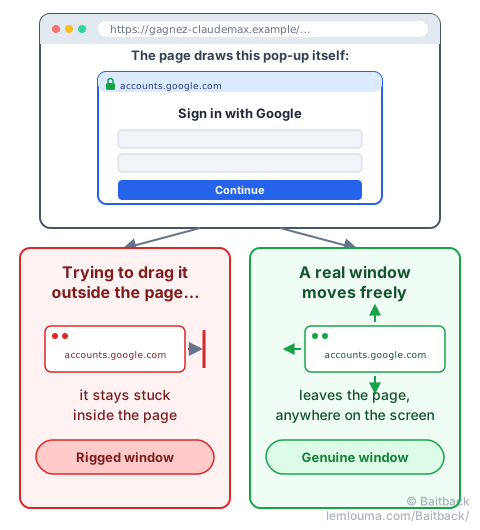
The simplest way to check a suspicious sign-in window: try dragging it outside the browser with the mouse. A real system window comes out without any trouble; a window merely drawn by the page stays stuck inside it.
Stealing session cookies (case 1) or intercepting a password behind a fake window (case 2) both aim at the same target: bypassing the sign-in rather than breaking it. The guide AiTM: when phishing steals your session, not just your password details another, closely related variant, capable of bypassing two-factor authentication in real time.
Case 3: Revolut, when a data breach becomes a tailor-made scam
On September 12, 2026, online bank Revolut confirmed it had disclosed some customers' data to an unauthorized third party. No intrusion into its systems: the attacker simply sent a fake official information request, from an email address belonging to a real government agency's domain, apparently compromised or spoofed. Convinced they were replying to a legitimate request, Revolut's team handed over customer files containing names, dates of birth, addresses, phone numbers, and sometimes copies of identity documents.
Days later, affected customers received very precise text messages flagging a suspicious operation on their account:
- The rigged text (smishing): armed with real stolen data, the attackers send personalized messages. Some appear directly in the same conversation thread as the victim's real Revolut texts, making them even more believable.
- The fake agent (vishing): a call sometimes follows, posing as the fraud department. Since the caller already knows the victim's name and recent transactions, trust builds quickly. They may then ask the victim to approve a push notification or read out a code received by text, under the pretext of “cancelling a fraudulent transfer.”
- The reversal: in reality, approving that code or notification directly authorizes a transfer of the victim's own funds to an account controlled by the attacker.
Revolut has stated that its systems and customers' money were not directly compromised by this breach, and that it never asks for a sign-in code by text or by phone. That is exactly the point that vishing campaigns try to make the victim forget, in the heat of the moment.
Three publicly documented elements of this case: Revolut's confirmation of the breach, reported by TechCrunch, Malwarebytes' analysis of the phishing texts, and Infosecurity Magazine's coverage of the smishing wave.
The trace: data stolen through an abuse of administrative trust is still stolen data: it can fuel targeted messages for months. A request coming from a real domain never guarantees the honesty of whoever sends it, exactly like an email that passes SPF and DKIM can still belong to a scammer (see Phishing: how scammers get their emails through).
What these three cases have in common
Three very different mechanics, but a single shared goal: borrowing a trust signal the victim cannot verify at a glance.
| Attack | What wrongly inspires trust | What is actually stolen |
|---|---|---|
| Rigged job offer | A locked archive the antivirus cannot inspect | Session cookies (access with no password) |
| Fake Claude Max giveaway | A window drawn to resemble a real system window | Google account credentials |
| Revolut | A real government agency domain, misused | Personal data, then transferred money |
None of these three attacks “breaks” anything technically: each one hijacks something we have learned to see as reassuring (an antivirus that lets things through, a window that looks official, an institutional domain) to obtain what a strong password no longer protects on its own.
How to spot these traps and fight back in practice
Faced with attacks whose appearance is almost entirely faked, trusting your eyes alone is no longer enough:
- Look at the real source, not the display: the sender name or the domain shown on screen are easy to fake. Pasting the full email into Baitback reveals the real sending server, its host and its abuse contact, on top of the SPF, DKIM and DMARC checks.
- Test the drag-and-drop on any sign-in window that appears after a click (see figure 2): if it refuses to leave the browser, it is not a real system window.
- Switch channels before acting on an unexpected call or text, even one signed by “the bank” or “HR”: call an official number back yourself, without going through the message received.
- Never read out a code or approve a push notification at someone else's request, however urgent it sounds: that single action alone authorizes the transaction.
- Report it, even after the fact: it won't undo what has already happened, but it helps cut off infrastructure still being used against other victims. The guide how to report phishing effectively, step by step covers the process in detail.
- A password-protected archive keeps the antivirus from checking its contents: that is exactly why it is used.
- A stolen session cookie opens an account with no password and no two-factor code.
- A sign-in window that cannot be dragged outside the browser is almost always a rigged window drawn by the page.
- A real, legitimate domain can be misused to obtain information without any system being directly hacked.
- No serious bank ever asks you to read out a code or approve a notification over the phone: doing so is the same as signing off on the transaction yourself.