The lifecycle of a phishing campaign
So far, each guide has zoomed in on one piece of the problem: reading a header, identifying a host, writing a good report. This one steps back and shows the whole campaign, from its creation to its end — often followed by another one starting elsewhere. It's the map: it places each guide at its spot along the journey.
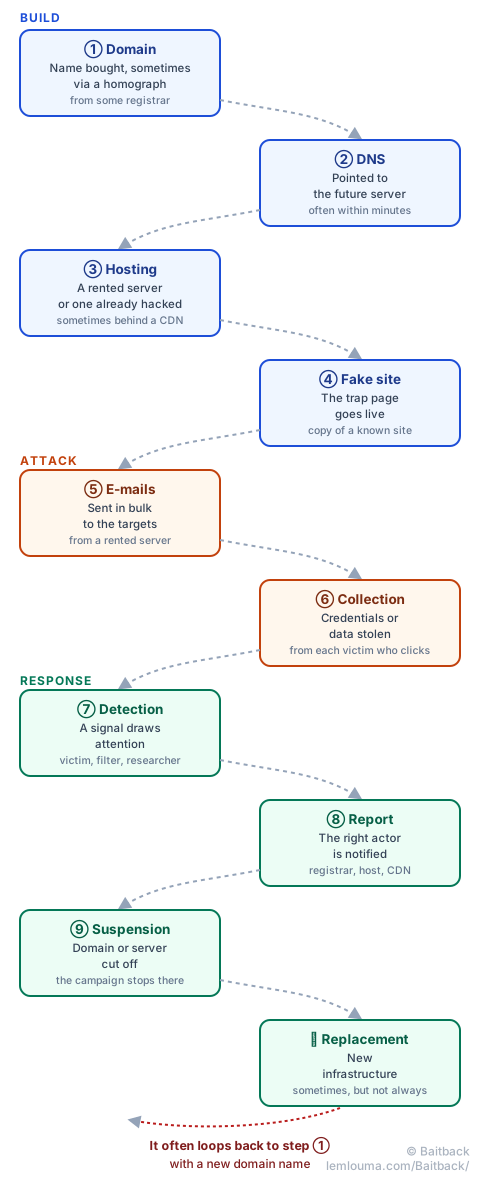
Phase 1 — Building the infrastructure
Before a single victim sees anything, four building blocks have to be put in place:
- Domain registration: a name is bought from some registrar, sometimes chosen to closely resemble a known brand, by playing on a character that mimics a Latin letter (see punycode and homograph domains).
- DNS configuration: the domain is pointed to the future server, often within minutes.
- Hosting: a server is rented for a few euros, or a legitimate site already hacked is hijacked; a CDN is sometimes added in front to mask the real address (see who controls what between registrar, host and CDN).
- Fake site goes live: a more or less faithful copy of a real login page is dropped onto that server.
Phase 2 — Launching the attack
With the infrastructure ready, the campaign can begin:
- Sending the e-mails: a message is blasted out in bulk, often from that same rented server or from a hijacked mailbox (see how scammers get their e-mails through).
- Data collection: every victim who enters their credentials on the fake site sends them straight to the scammer, in real time.
Phase 3 — The response
This is the longest phase, and the one where every actor can tip the outcome:
- Detection: a victim notices the trick, a technical filter spots an anomaly, or a researcher stumbles onto the campaign (see the cat-and-mouse game between researchers and crooks).
- Reporting: the right elements (URL, IP, headers, timestamp) are gathered and sent to the right actor (see the anatomy of an actionable report), after finding their abuse@ address (see finding a host's abuse@ address).
- Suspension: the registrar cuts the name, the host cuts the machine — each acts on their own link in the chain, and the campaign truly stops once both have happened.
- Infrastructure replacement: if the campaign is profitable, it doesn't always stop there. A new domain, sometimes at another registrar, restarts the cycle from step ①.
It's this last step that explains why reporting rarely works once and for all: suspending a domain ends that particular campaign, not necessarily the organization behind it. Hence the value of staying alert after a first takedown.
- A phishing campaign follows a ten-step path, grouped into three phases: build, attack, response.
- Each step leaves a different trace: a domain, a DNS setup, a server, an e-mail header.
- The response works on two distinct levers, the domain name and the server, which complement rather than replace each other.
- Taking down a campaign doesn't always stop its author: a new cycle can start again with new infrastructure.
Baitback steps in precisely at stage ⑧ of this map: starting from an e-mail or a link, it reconstructs the earlier steps (domain, IP, host) to prepare the report that triggers the suspension.